I used to start every Monday morning the same way. Open 11 tabs. Check email stats. Copy-paste a blog post link into five different social platforms. Schedule a newsletter manually. Set reminders to follow up with leads. By 10 AM, I had done a full day of work and had not written a single word.
That was before I discovered marketing automation.
Today, most of that Monday morning checklist runs itself. My newsletter goes out automatically. My blog posts get published and distributed without me touching them. My leads get nurtured while I sleep. And I spend more of my day doing what I actually love: writing content.
This article is everything I know about marketing automation tools as a content writer. I will walk you through what these tools are, how they work, which ones I actually use, and how you can build your own automated workflow from scratch. No technical background needed.
- What Is Marketing Automation? (And Why Writers Need to Care)
- The Real Cost of Not Automating
- The Writer’s Automation Stack: What You Actually Need
- Email Marketing Automation: The Highest-ROI Move for Writers
- In-Depth Review of the Best Marketing Automation Tools for Writers
- How to Build Your Automation Workflow: A Step-by-Step Guide
- Free Marketing Automation Tools: What You Can Build Without Spending a Cent
- Common Mistakes Writers Make with Marketing Automation
- Final Thoughts: Automation Is a Writer’s Best Tool
- Frequently Asked Questions
What Is Marketing Automation? (And Why Writers Need to Care)
Marketing automation is the use of software to handle repetitive marketing tasks automatically. Instead of doing the same thing over and over, you set it up once and the tool takes care of it for you.
For content writers, this could mean things like sending a welcome email the moment someone subscribes to your list, sharing your blog post across social media channels as soon as it goes live, or following up with a reader who downloaded your free guide.
The reason writers specifically need this is simple. We create a lot of content. That content needs to reach people. And getting content to people involves a mountain of repetitive tasks that eat into our writing time every single day.
Marketing automation does not replace the human part of writing. It handles everything around the writing so you can do more of the actual writing.
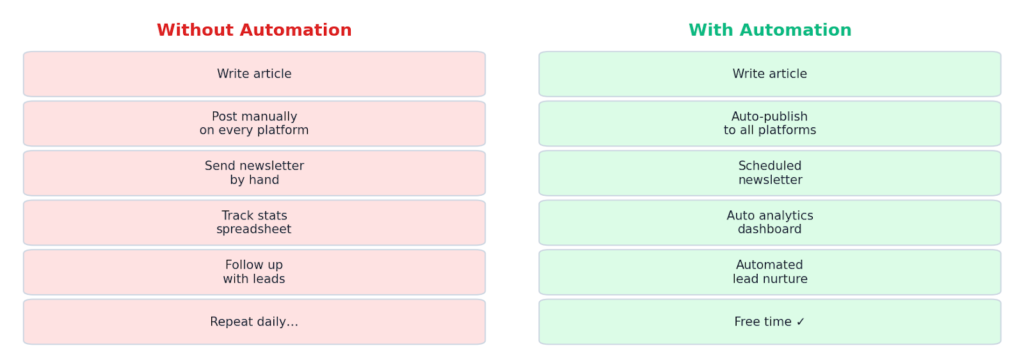
The difference between a writer who works 10-hour days and one who works 6-hour days and still produces more output is almost always automation. It is not about working harder. It is about removing the manual steps that slow everything down.
The Real Cost of Not Automating
Let me give you a real picture of what manual work actually costs a writer.
Say you write 4 articles a week. Each article needs to be shared on LinkedIn, Twitter, Facebook, and your newsletter. That is 4 tasks per article, times 4 articles, which adds up to 16 manual posting actions a week. Add in the time to check analytics, reply to automated sequences by hand, and manage leads, and you are easily burning 8 to 10 hours a week on distribution alone.
That is an entire work day, every week, just on tasks that software can do for you.
Over a year, that is 416 to 520 hours. Think about how many articles you could write in that time. How many clients you could serve. How much revenue you could generate.
| Key InsightWriters who automate distribution and email workflows report saving anywhere from 6 to 15 hours per week. That time goes directly back into writing, ideation, and client work. |
The Writer’s Automation Stack: What You Actually Need
You do not need 20 different tools. Most writers can get 80 percent of the benefit from a small, well-chosen stack. Here is how I think about it.
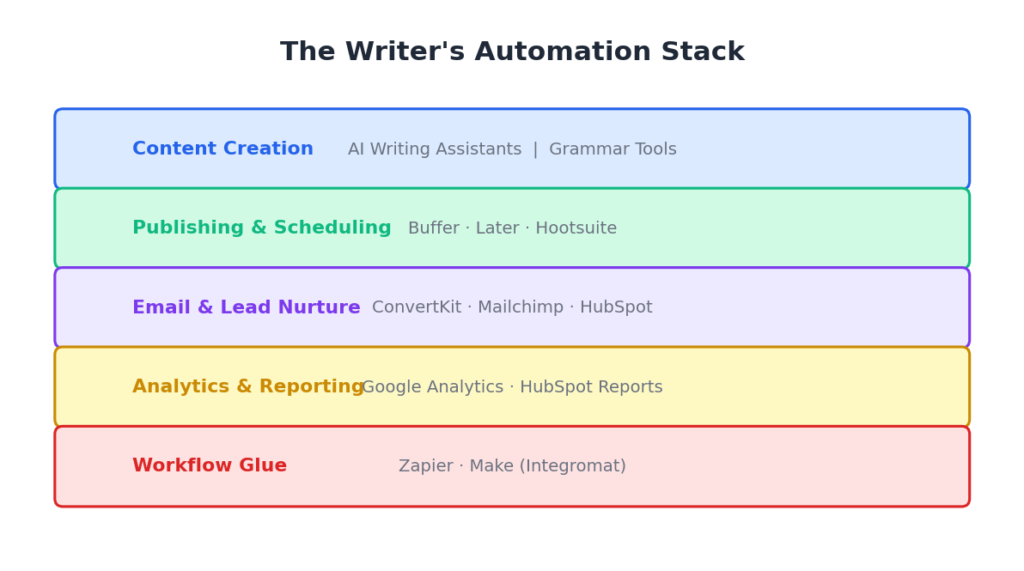
The five layers of a writer’s automation stack work together. Your content creation layer is where the writing happens. Your publishing layer handles distribution. Your email layer manages your list and nurtures readers. Your analytics layer tracks performance automatically. And your workflow glue layer connects everything together.
You do not need to set all of this up at once. Start with one layer, get it running smoothly, and then add the next. Most writers start with email automation because it has the most direct impact on revenue.
Email Marketing Automation: The Highest-ROI Move for Writers
If I had to pick just one type of automation, it would be email marketing automation. Every other channel is rented space. Social platforms change their algorithms. SEO takes time. But your email list is yours.
Email marketing automation means setting up a sequence of emails that go out automatically based on what a subscriber does. When someone joins your list, they get a welcome email. When they open that email and click a link, they get tagged as interested in that topic. When enough tags stack up, they get an offer that matches exactly what they care about.
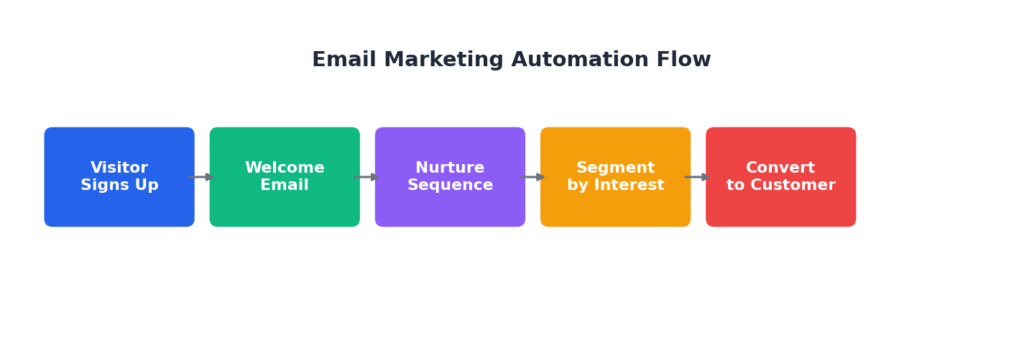
This whole process happens without you lifting a finger after the initial setup. A reader who signs up for your newsletter at 2 AM on a Sunday gets the same warm, personal welcome as one who signs up on a Tuesday afternoon.
The key components of an email marketing automation system for writers are the following.
- A lead magnet, which is a free resource you offer in exchange for an email address.
- A landing page where people enter their details.
- A welcome sequence of 3 to 5 emails that introduces you and builds trust.
- A broadcast schedule for regular newsletters.
- Automation rules that tag subscribers and trigger the right emails based on their behaviour.
Once this is set up, your email list works for you around the clock. I built my first welcome sequence in a weekend and it has been running, without changes, for over two years.
In-Depth Review of the Best Marketing Automation Tools for Writers
I have personally tested all of these tools. Here is my honest assessment of each one and how they are specifically useful for writers.
HubSpot: The Best Free All-in-One Option
HubSpot is the tool I recommend to any writer who is starting out and does not want to pay for five different subscriptions. Its free plan is genuinely useful, not just a teaser.
What you get on the free tier: a CRM to track every person who interacts with your content, landing page builder, email marketing with automation, and a form builder to capture leads. For a writer building their platform from scratch, this covers nearly everything.
As a writer, the most useful feature is the contact timeline. You can see exactly which piece of content each subscriber came from, which emails they opened, and which links they clicked. That tells you what your audience actually cares about, which makes your writing better.
The workflow builder, even on the free plan, lets you set up basic automation sequences. Someone downloads your free checklist, they get added to a nurture sequence, and HubSpot tracks everything. When you are ready to pitch a product or service, you know exactly who to pitch and what angle will resonate.
The paid plans unlock more powerful automation, A/B testing, and advanced reporting. But for most writers, the free tier will last you well into your first few thousand subscribers.
Best for: Writers who want a single tool to handle CRM, email, and landing pages without paying anything upfront.
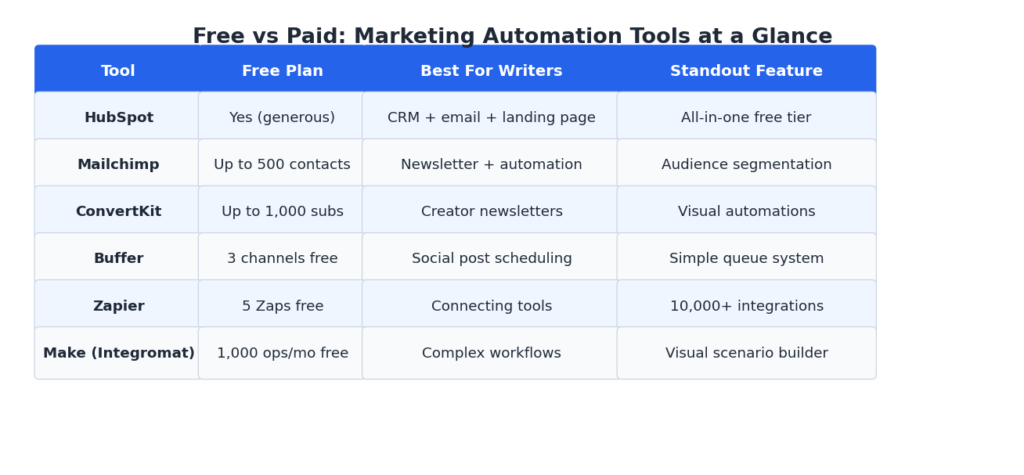
Free plan: Yes, very generous with no time limit.
Pricing: Free forever tier. Paid plans start at around $15 per month.
ConvertKit: Built for Creators, Loved by Writers
ConvertKit is the tool I use for my own email list and it is the one I most often recommend to established writers. It was built specifically for creators, and that shows in every feature.
The visual automation builder is where ConvertKit earns its reputation. You can map out an entire reader journey visually. When someone signs up, they enter the welcome sequence. If they click a specific link, they get tagged and moved to a different sequence. If they buy something, automation removes them from the sales sequence so they do not keep getting pitches for something they already bought.
This sounds complex but ConvertKit makes it visual. You literally drag arrows between boxes. There is no code involved.
For writers, the broadcast feature is excellent. You write your newsletter once and send it. But you can also set it up so that new subscribers automatically receive your best old newsletters in a logical order before they start getting your current ones. This means every new reader gets your best content, not just whatever you happened to write this week.
The free plan covers up to 1,000 subscribers with unlimited email sends and basic automation. That is enough to build real momentum before you need to pay anything.
Best for: Writers who are serious about email as a business channel and want powerful visual automations.
Free plan: Yes, up to 1,000 subscribers.
Pricing: Free up to 1,000 subscribers. Creator plan starts at $9 per month for up to 300 subscribers.
Mailchimp: The Classic That Still Delivers
Mailchimp is probably the first email marketing tool most people hear about, and there is a reason it has been around so long. It is reliable, well-documented, and has excellent free tier features for writers who are just getting started.
The email builder is the most polished in this category. If you care about how your newsletters look, Mailchimp gives you more design flexibility than most other tools. For writers who treat their newsletter as a brand extension, that matters.
The audience segmentation is genuinely powerful even on the free plan. You can segment your list based on what content they engaged with, when they joined, where they are located, and dozens of other factors. As a writer, this means you can send your fiction content only to fiction readers, and your productivity content only to the readers who signed up for that. Relevance goes up, unsubscribes go down.
The automation on the free plan is limited to single-step automations, which means you cannot build complex sequences without upgrading. But for a basic welcome email and a birthday greeting, it works fine.
One thing I noticed as a writer: Mailchimp’s analytics are excellent. The click map feature shows you exactly which links in your email people clicked, which helps you understand what your readers want to read more of.
Best for: Writers who prioritise email design and audience segmentation, especially in the early stages.
Free plan: Up to 500 contacts and 1,000 sends per month.
Pricing: Free tier available. Essentials plan starts at $13 per month.
Buffer: The Simplest Social Scheduling Tool for Writers
Buffer is how I handle social media without it eating my entire day. The premise is simple. You write your social posts in advance, add them to a queue, and Buffer publishes them at the times you set. You are done.
For writers, the most useful feature is the Start Page, which is a free link-in-bio page that Buffer creates for you. You can point your social followers to a page that lists all your recent articles, newsletter signup, and any other links you want to share. It updates automatically when you publish new content to certain platforms.
The free plan lets you connect three social channels and schedule up to 10 posts per channel. For most writers who are not running a social media agency, this is plenty. I have been using the free tier for years and it covers everything I need.
Where Buffer really shines for writers is the Analytics tab. After a few weeks of use, it shows you which types of posts get the most engagement. For a writer, that is research gold. You learn which topics resonate, which headlines work, and which formats get shared. That directly improves your writing strategy.
Buffer does not have the advanced features of some enterprise tools. But it is fast, clean, and does exactly what a writer needs without overwhelming you with options.
Best for: Writers who want to schedule social media posts with minimal setup and maximum simplicity.
Free plan: Yes, 3 channels and 10 scheduled posts per channel.
Pricing: Free tier available. Essentials plan starts at $6 per month per channel.
Zapier: The Glue That Holds Your Automation Stack Together
Zapier is different from every other tool in this list. It does not do any one thing on its own. What it does is connect your other tools together and make them talk to each other.
The concept is simple. You create a Zap, which is an automated action that runs when a trigger event happens. For example: when I publish a new blog post on WordPress, Zapier automatically sends the link to my Buffer queue, adds it to my email newsletter draft, and logs it in my Notion content tracker. One publish action triggers three automatic tasks.
For writers, the most powerful use cases are connecting your CMS to your email tool, automatically creating social posts from new blog content, sending form submissions to your CRM, and getting Slack or email notifications when important things happen in any of your tools.
The free plan gives you 5 Zaps with single-step triggers. That is enough to automate a few key workflows. The paid plans unlock multi-step Zaps and more sophisticated logic, which is where the real power comes in.
The learning curve on Zapier is gentle. You pick a trigger app, pick a trigger event, pick an action app, pick an action, and connect them. Zapier walks you through every step. I built my first Zap in under 20 minutes with no technical help.
Best for: Writers who use multiple tools and want them to work together automatically.
Free plan: Yes, 5 Zaps and 100 tasks per month.
Pricing: Free tier available. Starter plan starts at $19.99 per month.
Make (formerly Integromat): For Writers Who Want More Complex Workflows
Make is Zapier’s more powerful sibling. The free plan is more generous, giving you 1,000 operations per month, and the visual scenario builder is one of the best interfaces I have used for building workflows.
Where Make stands out compared to Zapier is in its ability to handle data transformation. If you need to reformat content, filter results, or run conditional logic in your automation, Make does this in a way that is still visual and understandable without being a developer.
For a writer, a practical example: I use Make to automatically reformat my long-form blog post content into a shorter format for LinkedIn, then schedule it through Buffer. The workflow takes the full post, extracts the first three paragraphs, adds a call to action, and puts it in my social queue. That used to take me 20 minutes per article. Now it takes zero.
The interface takes slightly longer to learn than Zapier, but the free plan is more capable and the paid plans are more affordable for the same level of functionality.
Best for: Writers who need more complex, multi-step automations and want a more powerful free plan.
Free plan: Yes, 1,000 operations per month.
Pricing: Free tier available. Core plan starts at $9 per month.
How to Build Your Automation Workflow: A Step-by-Step Guide
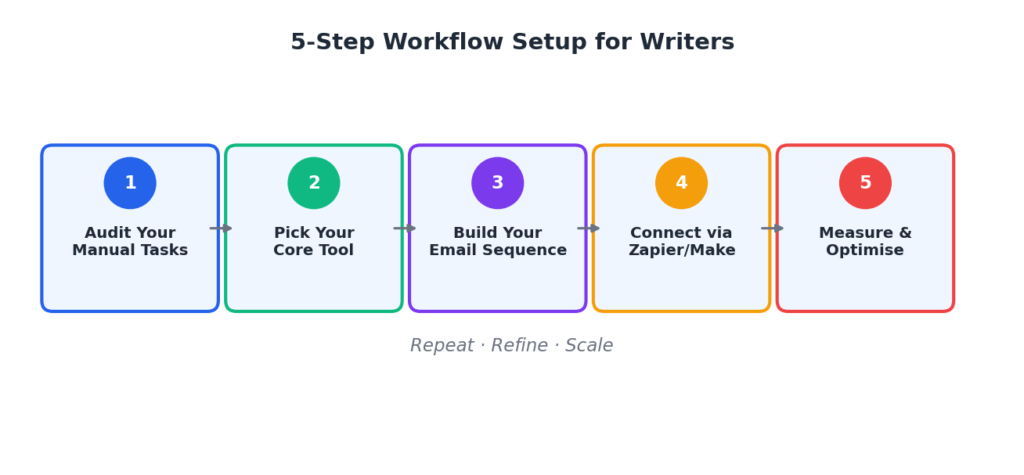
Building your automation workflow does not have to be overwhelming. Here is how to do it in five clear steps.
Step 1: Audit Your Manual Tasks
Before you automate anything, write down every repetitive task you do as a writer. Be specific. Include tasks like “copy blog post link and paste into social media,” “send weekly newsletter,” and “check analytics and log numbers in spreadsheet.” Time each task for one week.
This audit will show you exactly where your time is going and which tasks have the biggest automation opportunity.
Step 2: Pick Your Core Tool
Choose one primary tool based on your biggest time drain. If most of your manual time goes into email, start with ConvertKit or HubSpot. If it goes into social media, start with Buffer. If it goes into connecting different tools, start with Zapier.
Do not try to set up everything at once. Pick one tool, learn it properly, and get it working before adding another.
Step 3: Build Your Email Sequence
Even if email is not your biggest time drain right now, setting up a basic welcome sequence is the highest-leverage thing you can do. Write 3 to 5 emails. The first welcomes the subscriber and delivers the lead magnet. The second shares your best piece of content. The third tells your story and explains why you write what you write. The fourth asks a question to learn more about your reader. The fifth makes a soft offer or invites them to connect further.
Upload these into your email tool and set the delays. Email 1 sends immediately. Email 2 sends 2 days later. Email 3 sends 4 days later. Email 4 sends 7 days later. Email 5 sends 10 days later.
That is your first automated sequence. It runs itself indefinitely for every new subscriber.
Step 4: Connect Your Tools with Zapier or Make
Once your core tools are set up individually, connect them. The most useful connection for most writers is linking their content management system to both their social scheduling tool and their email platform.
The Zap looks like this: New post published in WordPress triggers Zapier, which creates a new Buffer post and creates a draft email in ConvertKit. You review and send the email, but the draft is already there waiting for you.
Step 5: Measure and Optimise
After your automations have been running for four weeks, look at the data. Which automated emails get the best open rates? Which social posts drive the most traffic to your articles? Use that data to improve your content, not just your automation.
Automation gives you better data than manual work because it removes human inconsistency from the equation. Every subscriber gets the same sequence. Every post goes out at the same optimal time. The results you see are clean, accurate signals about what your audience wants.
Free Marketing Automation Tools: What You Can Build Without Spending a Cent
One of the best things about the marketing automation landscape in 2025 is how much you can do for free. Here is a complete free stack that covers the most important automation needs for a writer.
- HubSpot free tier for CRM, email marketing, and landing pages.
- ConvertKit free tier for up to 1,000 subscribers with basic automations.
- Buffer free tier for scheduling posts to three social channels.
- Zapier free tier for five single-step automations connecting your tools.
- Google Analytics for traffic and content performance tracking.
This stack costs nothing and covers the following functions: capturing leads, nurturing subscribers with automated email sequences, distributing content to social media automatically, connecting your tools so data flows between them, and tracking what is working.
| Writer’s Pro TipStart with the HubSpot and Buffer free tiers. Get those working. Then add ConvertKit when your list hits 300 to 400 subscribers. Add Zapier when you find yourself doing the same manual connection between two tools more than twice a week. |
Common Mistakes Writers Make with Marketing Automation
I made most of these mistakes myself, so I know how easy they are to fall into.
Automating Before You Have a Strategy
Automation amplifies what you are already doing. If your email strategy is unclear, automating it just speeds up the confusion. Before you set up any automation, be clear on who your reader is, what you want them to do, and what value you provide. Automation is the accelerator, not the engine.
Setting It and Forgetting It Completely
Automation is not a one-time setup. Your welcome email sequence should be reviewed every three months. Your social posting times should be updated when your analytics show a better slot. Your lead magnet should be refreshed when it becomes outdated. Scheduled check-ins are as important as the automation itself.
Over-Automating the Personal Stuff
Some things should not be automated. Personal replies to readers. Responses to thoughtful comments. Direct messages to important clients. Readers can tell the difference between a triggered autoresponder and a human being. The personal moments are where your brand is built. Keep those human.
Ignoring the Data Your Automation Generates
Every automation tool generates data. Email open rates, click rates, unsubscribes, best send times, top-performing subject lines. Most writers set up the automation and never look at this data. That is leaving money on the table. Check your key metrics monthly and let the data guide your content decisions.
Final Thoughts: Automation Is a Writer’s Best Tool
I want to be honest about something. When I first started looking into marketing automation, I worried it would make my work feel impersonal or robotic. I was wrong.
Automation freed me from the robotic parts of my job so I could do more of the human parts. I write more now than I ever did before I automated. I connect with my readers more meaningfully because I am not exhausted from hours of manual distribution work. My newsletter feels more personal because I have time to think carefully about what I am writing instead of rushing to meet a manual deadline.
The tools in this article range from completely free to a few dollars a month. The time they save you is worth many times that cost within the first week of use.
Start with one tool. Build one automation. Run it for four weeks. Then add the next one. A year from now, you will have a system that works around the clock for you, and you will wonder how you ever managed without it.
Frequently Asked Questions
1. Do I need technical skills to set up marketing automation as a writer?
No. All the tools covered in this article are designed for non-developers. HubSpot, ConvertKit, Buffer, and Zapier all use visual interfaces with drag-and-drop builders and step-by-step setup guides. If you can use Gmail and Google Docs, you have all the technical skills you need to get started with marketing automation.
2. Which is the best free marketing automation tool for a writer just starting out?
HubSpot is the best single free tool because it covers the most ground: CRM, email marketing, landing pages, and basic automation, all on one free plan with no time limit. If your primary focus is email specifically, ConvertKit’s free plan for up to 1,000 subscribers is the better choice. For social media scheduling only, Buffer’s free plan is ideal.
3. How long does it take to set up a basic email marketing automation workflow?
A basic welcome sequence of 3 to 5 emails, connected to a simple lead magnet landing page, can be set up in a weekend. The writing of the emails takes the longest. The actual technical setup in a tool like ConvertKit or HubSpot typically takes 2 to 4 hours once you know what you are doing. Most tools also offer templates that cut this time in half.
4. Will automated emails feel impersonal to my readers?
Not if you write them well. The key is to write automated emails the same way you write personal ones. Use the subscriber’s first name. Write in your natural voice. Share real stories and experiences. The reader does not see the automation mechanics. They only see the email in their inbox. A well-written automated welcome email can feel more personal than a rushed manual one because you had time to craft it carefully.
5. How do I know if my marketing automation is actually working?
Look at four key metrics. Email open rate tells you whether your subject lines and sender reputation are good. Click-through rate tells you whether your content is compelling enough to drive action. Unsubscribe rate tells you whether your emails are relevant to your audience. And conversion rate, whether that means a sale, a sign-up, or a download, tells you whether your automation is achieving its goal. Check these monthly and compare them to your benchmarks. Most email tools show these numbers automatically in their dashboard.