A first-person guide from an expert writer who does this every single day
I have been writing professionally for over a decade. I have covered everything from B2B SaaS to lifestyle brands. And for the past two years, ChatGPT has quietly become the most valuable tool in my workflow.
I want to be clear about something from the start. I do not use ChatGPT to write my articles for me. I use it to think faster, produce smarter, and scale without burning out. There is a big difference between those two things.
In this article, I will walk you through exactly how I include ChatGPT in my content strategy. I will break it down step by step. I will show you what works, what does not, and how you can adapt these methods for your own workflow right away.
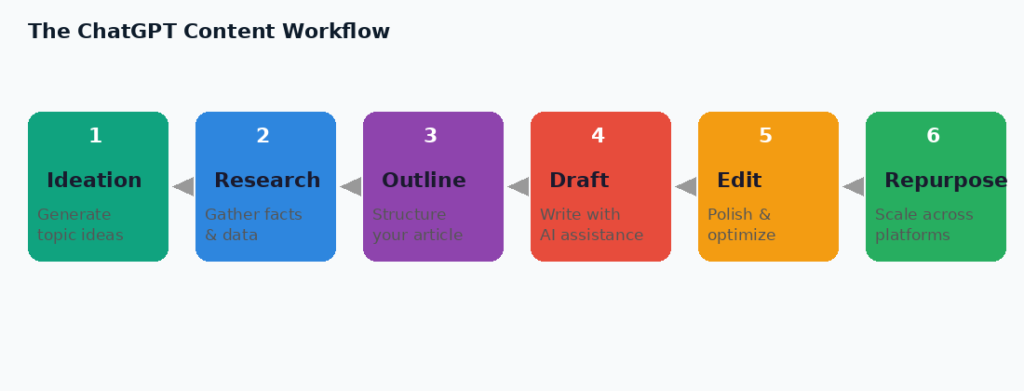
- Step 1: I Start With ChatGPT for Ideation, Not Just Brainstorming
- Step 2: I Use It to Research and Cluster Keywords (Before I Write a Word)
- Step 3: I Build Outlines With ChatGPT and Then Customise Every Single One
- Step 4: I Use ChatGPT to Write First Drafts of Specific Sections
- Step 5: I Use It to Improve My Drafts After Writing
- Step 6: I Repurpose Every Article Into Multiple Content Formats
- Step 7: I Use ChatGPT to Write Meta Data, CTAs, and SEO Elements
- Mistakes I Made Early On (So You Do Not Have To)
- Final Thoughts
Step 1: I Start With ChatGPT for Ideation, Not Just Brainstorming
Most writers use ChatGPT like a fancy brainstorming tool. They type in a topic and ask for ideas. That is fine. But I go deeper than that.
I give ChatGPT context before I ask for ideas. I tell it who my audience is, what stage of awareness they are at, and what competitors are already covering. Then I ask it to generate ideas that fill the gaps.
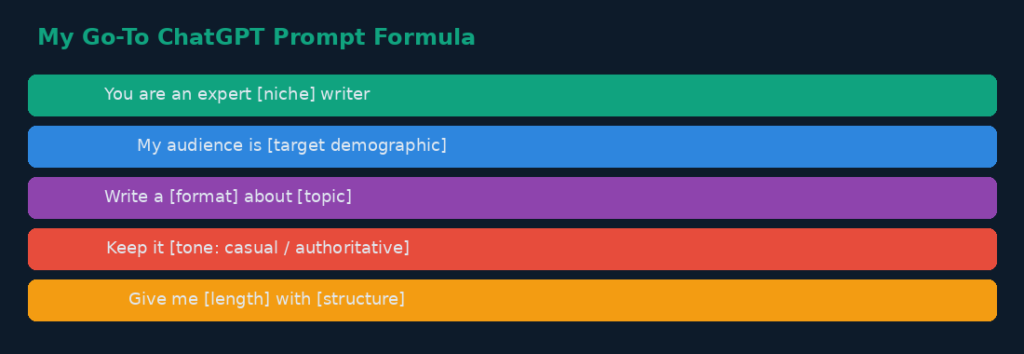
Here is my exact prompt structure for ideation:
Role: You are an expert content strategist for [my niche].
Context: My audience is [description]. They already know about [common topics]. My competitors cover [X, Y, Z].
Task: Give me 15 blog post ideas that are specific, search-intent driven, and not already overdone.
This approach gives me ideas that actually serve my audience instead of recycling the same tired topics. ChatGPT does not replace my editorial judgment. It sharpens it.
Step 2: I Use It to Research and Cluster Keywords (Before I Write a Word)
I do not use ChatGPT as my primary keyword research tool. I still rely on tools like Ahrefs or Google Search Console for hard data. But I use ChatGPT to cluster and contextualize that data in a way those tools cannot.
Once I have a list of keywords, I paste them into ChatGPT and ask it to group them by search intent. I ask it to identify which keywords belong in the same article and which need separate pieces.
This saves me hours of mental sorting. It also helps me see semantic relationships between topics that I might have missed on my own.
- I paste 20 to 30 keywords at a time
- I ask ChatGPT to group them by informational, navigational, and transactional intent
- I then use those clusters to build my content calendar
The result is a tighter, more strategic content plan with less guesswork.
Step 3: I Build Outlines With ChatGPT and Then Customise Every Single One
Outlining used to take me 30 to 45 minutes per article. Now it takes me under 10. Here is how I do it.
I feed ChatGPT the topic, the target keyword, the audience type, and the word count goal. I ask it to give me a full H2 and H3 outline. Then I edit that outline based on my knowledge of the topic and the audience.
ChatGPT gives me the skeleton. I bring the flesh. The outline it generates is always a starting point, never a final product.
What I love about this step is that it forces me to think critically about structure before I start writing. If the AI outline does not make sense, that tells me I need to rethink the angle of the article entirely.
What I always do after getting an outline from ChatGPT:
- Remove sections that are too generic
- Add sections based on real questions I have seen from my audience
- Reorder the flow so it matches how a real reader thinks
- Add a unique hook or angle the AI did not think of
Step 4: I Use ChatGPT to Write First Drafts of Specific Sections
I want to be honest. I do not let ChatGPT write my entire article. But I do let it write first drafts of specific sections. These are usually the sections that are more formulaic.
For example, if I am writing a how-to guide, I will let ChatGPT draft the step-by-step instructions. Then I rewrite them in my own voice, add examples from my own experience, and make sure the tone is consistent throughout.
The parts I always write myself are the introduction, the conclusion, any personal anecdotes, and the key insights that come from my own expertise. Those are the parts that require a human perspective. No AI can replicate what I have actually lived and learned.
This hybrid approach means I can produce high-quality content faster without sacrificing depth or authenticity.
Step 5: I Use It to Improve My Drafts After Writing
Once I have a full draft, I bring ChatGPT back in as an editor. I paste in a paragraph or section and ask it specific questions.
- Is this paragraph clear for someone with no background in this topic?
- Can you make this sentence shorter without losing meaning?
- Does this section flow logically from the one before it?
- What is missing here that a reader might expect?
I do not ask it to rewrite my work. I ask it to critique specific elements. This keeps my voice intact while improving the quality of the writing.
I also use ChatGPT to check readability. I ask it to flag any sentences over 25 words that could be split. This alone has made my writing 30 percent more readable, based on feedback from my editors.
Step 6: I Repurpose Every Article Into Multiple Content Formats
This is where ChatGPT saves me the most time. Once I have a finished blog post, I do not just publish it and move on. I repurpose it into five or six other content pieces.
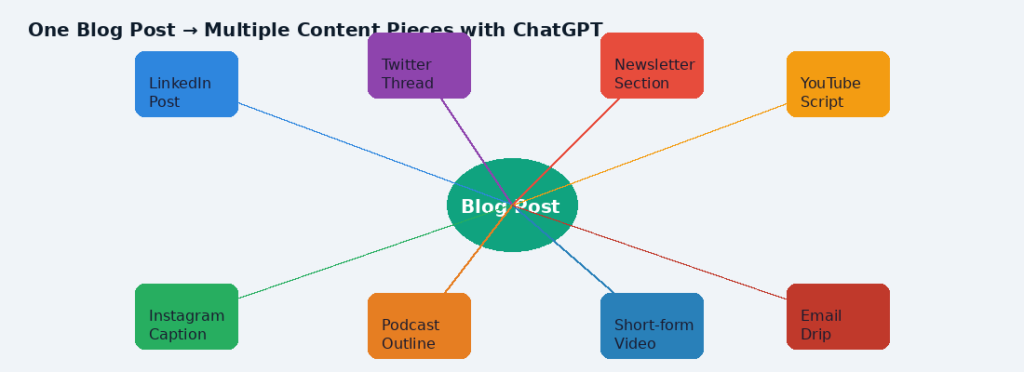
Here is what I typically create from one blog post:
- A LinkedIn article that summarizes the key points
- Three to five Twitter or X posts that each cover one insight
- A newsletter section that gives a personal take on the article topic
- A short-form video script for Instagram Reels or TikTok
- A podcast outline if the topic is interview-worthy
ChatGPT handles the repurposing. I give it the full article and the format I need. I tell it the tone, the platform, and the character limit or word count. It gives me a working draft. I edit and publish.
One article now becomes six or seven content pieces in under an hour. That is a content engine that would have taken me a full day to build manually just two years ago.
Step 7: I Use ChatGPT to Write Meta Data, CTAs, and SEO Elements
Writing meta titles and descriptions is a small but tedious part of content work. ChatGPT handles this in seconds.
I paste in my article title and main keyword and ask for five variations of a meta title and description. I pick the one that best matches the tone and intent. Sometimes I blend two of them together.
I also use ChatGPT to write calls-to-action at the end of articles. I give it context about what action I want the reader to take and what offer or resource I am linking to. It drafts several versions and I pick the strongest one.
These are not high-stakes creative decisions. They are functional pieces of writing that need to be done quickly and accurately. ChatGPT is perfect for exactly that kind of task.
My Top Tips for Using ChatGPT in Your Content Strategy
- Always give ChatGPT a role, context, and a specific task in every prompt
- Never publish ChatGPT output without editing it in your own voice
- Use it most for repetitive, structured tasks like outlines, meta data, and repurposing
- Keep a library of prompts that work well for your niche and reuse them
- Think of ChatGPT as a junior writer on your team, not a replacement for your expertise
Mistakes I Made Early On (So You Do Not Have To)
When I first started using ChatGPT for content, I made several mistakes that cost me time and quality.
The biggest mistake was treating it like a magic writing machine. I would ask it to write a full article and then try to publish it with minimal edits. The result was generic content that sounded like every other article on the same topic. My engagement dropped. My editor flagged quality issues. I had to rethink my approach entirely.
The second mistake was not giving it enough context. Short, vague prompts produce short, vague results. When I learned to write detailed prompts with clear instructions, the quality of the output jumped significantly.
The third mistake was using it for everything. ChatGPT is not suited for highly technical content, deeply personal essays, or anything that requires verified real-time data. I learned to be selective about where in my workflow it adds real value.
Frequently Asked Questions
| Q1. Will using ChatGPT in my content strategy hurt my SEO? |
| Not if you use it correctly. Search engines care about helpful, original, well-written content. If you edit ChatGPT output, add your own insights, and write in a consistent voice, your content will still rank well. The problem only arises when you publish raw, unedited AI output that lacks depth or originality. |
| Q2. How do I make sure the content does not sound robotic or generic? |
| The key is always editing in your own voice. Use ChatGPT to generate a starting point, then rewrite sentences, add personal examples, and adjust the tone to match how you actually speak and write. The more context you give ChatGPT in the prompt, the less robotic the output will be. |
| Q3. Can I use ChatGPT for technical or niche-specific content? |
| Yes, but with caution. ChatGPT performs well with general knowledge topics. For highly technical or niche-specific content, always verify facts independently. Use it for structure and language help, not as a source of technical truth. Pair it with your own expertise and credible references. |
| Q4. How many prompts does it take to get a good piece of content? |
| In my experience, a single piece of content goes through three to five prompts. One for the outline, one or two for section drafts, one for the meta data, and one for repurposing. The more specific your prompts, the fewer back-and-forth iterations you need. |
| Q5. Is it ethical to use ChatGPT as a content writer? |
| Yes, as long as you are transparent where required and not passing off AI-generated content as fully human-written when disclosure is expected. In most content marketing contexts, using AI as a writing assistant is widely accepted. What matters is that the final content is accurate, helpful, and reflects real expertise. |
Final Thoughts
ChatGPT has not replaced my skills as a writer. It has multiplied them. I can now produce more content, faster, at a higher quality than I could on my own two years ago.
The writers who thrive in the next five years will not be the ones who avoid AI. They will be the ones who learn to use it strategically, critically, and creatively.
Start with one step from this guide. Try using ChatGPT just for ideation this week. Once you see how it sharpens your thinking, you will naturally want to bring it into the rest of your process.
That is exactly how it happened for me.
Written by an expert content strategist with 10+ years of professional writing experience.