I have been writing content professionally for over a decade. In that time, one question has come up again and again from fellow writers, editors, and clients: how do you know your content is truly original?
The honest answer is that you cannot rely on memory alone. The internet is a massive repository of text. Without a plagiarism checker, even the most careful writer risks accidentally mirroring something that already exists online.
I have personally tested dozens of plagiarism tools over the years. Some impressed me. Others disappointed me completely. In this article, I am sharing everything I know about the best plagiarism checkers available right now, what they do well, where they fall short, and how to pick the right one for your writing workflow.
Whether you write blog posts, academic papers, marketing copy, or news articles, a good plagiarism checker is not optional. It is a core part of a professional writer’s toolkit.
- Why Plagiarism Checking Is Non-Negotiable for Writers
- What Makes a Good Plagiarism Checker
- The Best Plagiarism Checkers I Have Actually Used
- Free vs Paid Plagiarism Checkers: Which One Should You Use
- How I Use a Plagiarism Checker in My Writing Workflow
- Tips for Getting the Most Out of Any Plagiarism Checker
- My Personal Recommendation Based on Writer Type
- Final Thoughts
- Frequently Asked Questions
Why Plagiarism Checking Is Non-Negotiable for Writers
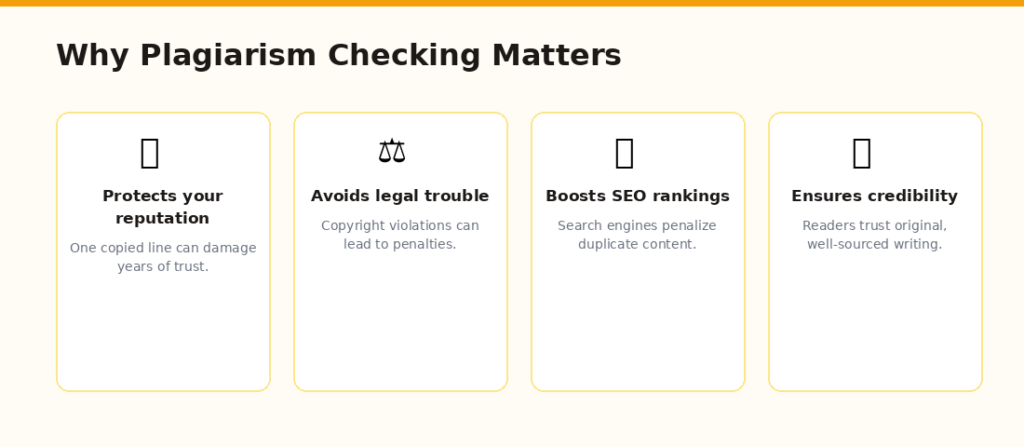
Plagiarism checking protects your reputation, SEO, and credibility as a writer
Some writers think plagiarism only happens when someone copies another person’s work on purpose. That is a misconception. Accidental plagiarism is far more common than most people realize.
Here is how it happens. You research a topic across ten articles. You absorb the language. When you write, phrases from those sources creep in without you noticing. You are not stealing. But the result still reads like someone else wrote it.
A plagiarism checker catches those invisible overlaps before your client, editor, or professor does.
The real cost of skipping the check
I learned this the hard way early in my career. I submitted a piece I was genuinely proud of. The client came back and flagged three sentences that matched sources I had not cited. It was embarrassing. It also cost me a revision round and left a dent in that client relationship.
Since then, I never submit anything without running it through a plagiarism tool first. Not because I do not trust myself. Because the stakes are too high to leave it to chance.
- Search engines penalize duplicate content, hurting your SEO
- Clients and editors lose trust in writers who submit flagged content
- Academic consequences for plagiarism can be severe and permanent
- Your reputation as an original thinker is one of your most valuable assets
What Makes a Good Plagiarism Checker
Not all plagiarism checkers are built the same way. Over the years, I have developed a personal checklist for evaluating any tool before I commit to it. Here is what actually matters.
Database size
The larger the database, the better the scan. A tool that only checks against a handful of websites will miss a lot. The best tools index billions of web pages, academic journals, news sources, and even paywalled content.
Accuracy and false positives
Some tools flag common phrases as plagiarism. If a tool tells me that the phrase ‘content marketing strategy’ is copied, that is a false positive. A good checker is smart enough to ignore generic language and only flag genuinely copied sentences.
AI content detection
This is a newer feature but one that has become increasingly important. Many clients now require content to pass both plagiarism checks and AI detection. Tools that combine both in one scan save a lot of time.
Report clarity
A good report shows exactly which sentences are flagged, links to the original source, and gives you a clear similarity percentage. Vague results are useless. I need to know what to fix and where it came from.
Word count limits
Free plans almost always have strict limits. For a 2000-word article, some tools only allow 500 words per scan. That means running multiple scans, which is inefficient. Paid plans usually remove this friction entirely.
The Best Plagiarism Checkers I Have Actually Used
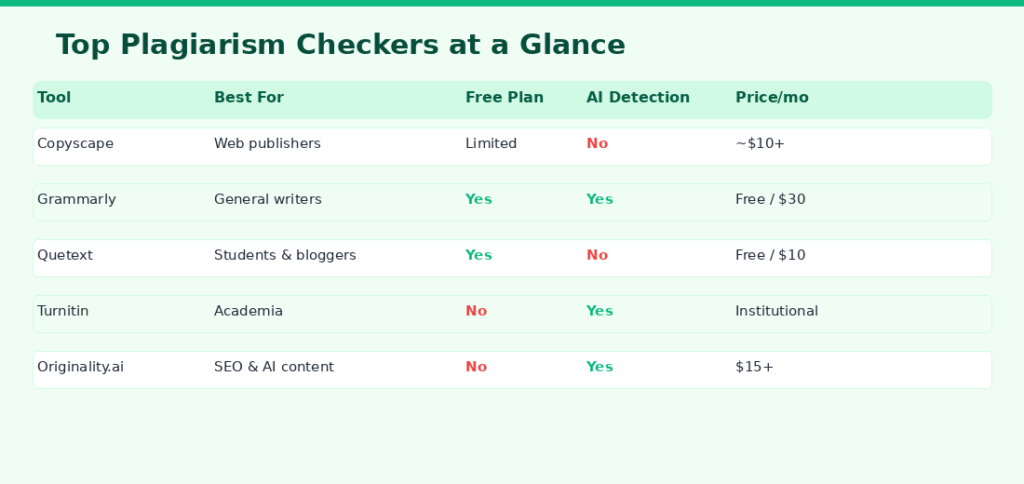
A quick comparison of the top plagiarism checkers for writers
1. Copyscape
Copyscape is the tool I have used the longest. It is specifically designed to check whether your content has been copied elsewhere on the web. That makes it extremely useful for publishers who want to make sure no one has scraped their content.
The interface is simple. You paste a URL or text, and it scans for matches. The results are fast and fairly accurate.
Best for: Web publishers, bloggers, and anyone checking if their existing content has been duplicated online.
Free plan: Limited. The basic version lets you check a URL for free, but more thorough checks require credits.
Downside: No AI detection. Interface feels dated. Academic database access is limited.
Copyscape is my go-to for quick spot checks on published content. For pre-submission checks, I use something more robust.
2. Grammarly
Most writers already use Grammarly for grammar and clarity. But its plagiarism checker is genuinely good. It scans your content against billions of web pages and returns a match percentage along with highlighted sections.
What I like most is that it is integrated into the writing workflow. You do not have to export your document to a separate tool. You just click one button while you are already editing.
Best for: General content writers who already use Grammarly for editing.
Free plan: The plagiarism checker is only available on the Premium plan.
Downside: Primarily web-based. Does not check against academic journals as deeply as Turnitin.
3. Quetext
Quetext is a tool I recommend to freelancers who need a solid plagiarism checker without a large budget. It has a clean interface, a decent free tier, and uses what it calls DeepSearch technology to analyze sentence structure rather than just looking for exact matches.
That last part matters. A writer who paraphrases heavily will sometimes fool simpler tools. Quetext catches paraphrased content more reliably than many of its competitors in the same price range.
Best for: Bloggers, students, and freelance writers on a budget.
Free plan: Yes, with a 500-word limit per check and 5 checks per month.
Downside: No AI detection on any plan. Database is smaller than enterprise-grade tools.
4. Turnitin
Turnitin is the gold standard in academic plagiarism detection. If you write for universities, research institutions, or academic journals, this is the tool your content will be checked against.
Its database is enormous. It includes academic papers, dissertations, journals, and student submissions going back decades. It is thorough in a way that no other tool matches for academic writing.
Best for: Academic writers, students, and educators.
Free plan: Not available for individuals. Access is typically through institutions.
Downside: Expensive and inaccessible for independent writers. Not designed for web content.
5. Originality.ai
Originality.ai is the newest tool on my radar, and it has quickly become one of my favorites for client work. It was built specifically to address the AI writing boom. It checks for plagiarism and AI-generated content in one scan.
For content agencies and SEO writers, this is a major advantage. Clients increasingly want proof that content is both original and human-written. Originality.ai gives you both reports in a single click.
Best for: SEO writers, content agencies, and anyone producing content for clients who require AI detection.
Free plan: No free plan. Credit-based pricing starts affordable for small volumes.
Downside: Newer tool, so its database is smaller than Copyscape or Turnitin. AI detection accuracy improves constantly but is not perfect.
6. Duplichecker
Duplichecker is a free tool that many beginner writers start with. It is simple to use and gives a basic similarity score for short documents.
I would not rely on it for professional work. The database is limited, false positives are common, and it lacks any premium features. But for a quick sanity check on a short blog intro or social post, it gets the job done without spending anything.
Best for: Beginners and casual users checking short-form content.
Free plan: Yes, fully free with some daily limits.
Downside: Not suitable for professional use. Limited accuracy and database coverage.
Free vs Paid Plagiarism Checkers: Which One Should You Use
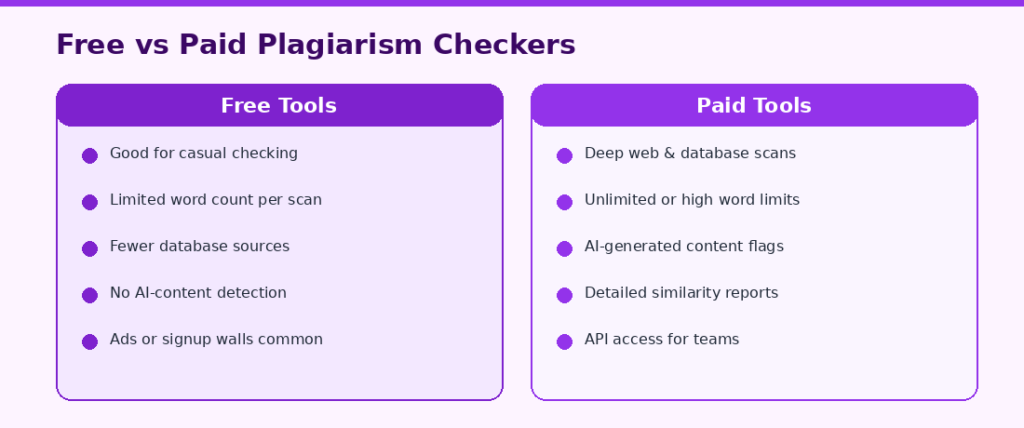
Free tools work for casual use, but paid tools are built for professional writing workflows
This is a question I get asked constantly. My answer depends on the context of your writing.
If you are a student checking a single assignment, a free tool is probably sufficient. If you are a professional content writer submitting work to clients every week, a paid tool is worth every penny.
When free tools are enough
- You write occasionally, not professionally
- Your documents are short, under 500 words typically
- You only need a rough similarity score, not a detailed report
- Your client or institution does not specify which tool to use
When you need a paid tool
- You produce content daily or at high volume
- Your clients require a formal plagiarism report
- Your content touches on academic or legally sensitive topics
- You need AI detection alongside plagiarism scanning
- You want access to academic journal databases
My rule: if plagiarism could cost you a client, a contract, or your credibility, do not gamble on a free tool.
How I Use a Plagiarism Checker in My Writing Workflow
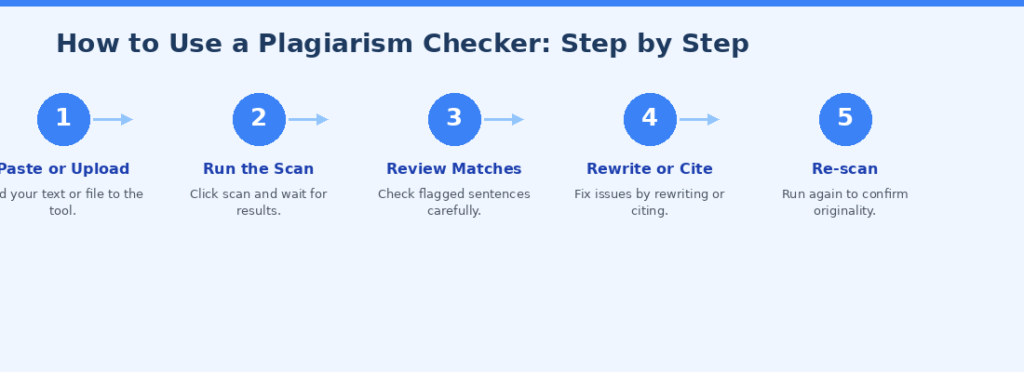
A simple five-step process for integrating plagiarism checks into your writing routine
Most writers think of plagiarism checking as something you do at the very end, right before submission. I disagree. I build it into different stages of my process.
After the first draft
Once I finish a rough draft, I run a quick scan before I even start editing. This gives me an early warning about any phrases that might need to be reworked. Fixing them now is easier than rewriting a polished sentence later.
Before final submission
I always run a final scan right before I hit send. Even if I made no changes that I think could introduce new matches, this is my last line of defense. It takes two minutes and has saved me from embarrassment more than once.
When working with research-heavy content
If I am writing something that involved heavy research, I am especially careful. I will scan mid-draft as well, particularly after any section that involved direct reading from sources. The risk of accidental phrase absorption is highest in these sections.
After client revisions
This one surprises people. But if a client sends back a heavily revised version of my draft and asks me to incorporate their edits, I always scan again. Clients sometimes paste in text from other sources without realizing it. Protecting the final submission is my responsibility, not theirs.
Tips for Getting the Most Out of Any Plagiarism Checker
The tool itself is only part of the equation. How you interpret and act on the results matters just as much.
Do not panic over a 10 to 15 percent similarity score
A small percentage of similarity is normal. Common phrases, technical terminology, and properly cited quotes will always show up as matches. A similarity score below 15 percent is generally considered acceptable for most types of content.
Read the flagged sentences in context
Do not just look at the percentage. Click through to see exactly what was flagged and compare it to the source. Sometimes a short phrase matches coincidentally. Sometimes the match is a genuine problem. You need to look at it yourself.
Rewrite rather than rephrase
If a sentence is flagged, do not just swap a few words. That approach often leaves the underlying structure too similar. Instead, close the browser, think about what you are trying to say, and write a fresh sentence from scratch.
Use citation correctly
If you are quoting or referencing a source directly, cite it. A plagiarism checker should not flag properly attributed quotes as a problem, and even if it does, you have the citation as evidence of intentional reference rather than copying.
Combine with a writing style check
Plagiarism checking tells you whether your words overlap with someone else’s. It does not tell you whether your writing is clear, engaging, or well-structured. Use a grammar and style tool alongside your plagiarism checker for the best results.
My Personal Recommendation Based on Writer Type
There is no single best tool for every writer. Here is how I would match tools to writer types based on my own experience.
Freelance content writers and bloggers: Grammarly Premium or Quetext. Both are affordable, easy to use, and cover the databases most relevant to web content.
SEO writers and content agencies: Originality.ai. The combined plagiarism and AI detection is a huge time-saver and increasingly required by clients.
Academic writers and students: Turnitin if your institution provides access. If not, Grammarly with its academic database access is a strong alternative.
Publishers checking for content scraping: Copyscape. It is purpose-built for this exact use case.
Beginners and occasional writers: Start with Duplichecker or Quetext’s free plan. Upgrade when your volume or stakes increase.
My everyday combination is Grammarly for editing and plagiarism checks on general articles, and Originality.ai for any content going to SEO-focused clients.
Final Thoughts
After years of professional writing, I can say with confidence that a plagiarism checker is not just a protective tool. It is a professional habit.
The best writers are not the ones who never make mistakes. They are the ones who have systems in place to catch mistakes before they matter. Running a plagiarism check is one of the simplest, fastest, and most effective parts of that system.
Start with whatever tool fits your budget and workflow. Build the habit of checking before you submit. Over time, you will develop an instinct for what good, original writing looks like, and the checker will simply be the final confirmation of what you already know.
Pick one tool from this list today. Run your next piece through it. See what comes back. That one habit could save your reputation more times than you realize.
Frequently Asked Questions
1. Is a free plagiarism checker good enough for professional content writing?
Free plagiarism checkers can work for light or occasional use, but they often have word limits, smaller databases, and lack features like AI detection or academic journal access. For professional content writing, where your credibility is on the line, investing in a paid tool gives you more accurate results and the detailed reports that clients often expect.
2. What plagiarism percentage is considered acceptable for a blog post or article?
Most industry professionals consider a similarity score below 15 percent to be acceptable for web content. That small percentage typically accounts for common phrases, technical terms, and properly cited references. Anything above 20 to 25 percent warrants a closer review of the flagged sections. Academic writing tends to have a stricter threshold, usually under 10 percent.
3. Can a plagiarism checker detect AI-generated content?
Not all plagiarism checkers can detect AI-generated content. Traditional tools only check for text overlap with existing sources. Dedicated AI detection tools, like Originality.ai or the AI detection feature in some newer Grammarly plans, analyze writing patterns and linguistic signals to flag machine-generated text. If your clients require both checks, choose a tool that combines both functions.
4. Will paraphrasing a source help me avoid plagiarism detection?
Surface-level paraphrasing, where you swap a few words while keeping the same sentence structure, will often still be flagged by smarter tools like Quetext. True originality means understanding a source and expressing its ideas in your own natural voice. If a sentence needs significant rewriting, close the source entirely, think about the concept, and write it fresh without looking at the original.
5. How often should a content writer run a plagiarism check?
At a minimum, run a check before every final submission. For research-heavy articles, I recommend checking mid-draft as well, especially after sections where you read extensively from sources. If a client or collaborator has revised your draft, scan again before submitting the final version. Building this into your routine adds only a few minutes but significantly reduces risk.