An honest review of the Best 7 LinkedIn Post Scheduling Tools for Businesses
I have been creating LinkedIn content professionally since 2018. In that time, I have managed accounts for startup founders, enterprise marketing teams, B2B consultants, and my own personal brand.
One thing became clear very early on: you cannot grow on LinkedIn by winging it. Posting manually every day at different random times, with no system behind it, is a guaranteed path to burnout and inconsistent results.
So I started using scheduling tools. And I did not just try one. Over the past three years, I have personally paid for and tested more than a dozen tools. I ran real content calendars through them. I tracked engagement data. I managed client approvals inside them. I wrote thousands of posts using their editors and AI features.
This is not a list of tools I researched from the outside. This is an account of what I found inside each one, what the real users on review platforms are saying, and how each tool performs when you actually depend on it.
Let me walk you through every tool in detail.
TL;DR: Best LinkedIn Post Scheduling Tools at a Glance
Short on time? Here is a quick summary of every tool reviewed in this article and exactly who each one is built for.
1. Buffer: Best for beginners and solo creators who want a simple, reliable scheduler with a usable free plan.
2. Hootsuite: Best for agencies and marketing teams managing LinkedIn for multiple clients.
3. Taplio: Best for serious LinkedIn creators and B2B marketers who want the deepest LinkedIn-specific toolset available.
4. Publer: Best for budget-conscious creators and anyone who relies on evergreen content.
5. Later: Best for visual-first brands and content teams that need to plan their LinkedIn presence as a cohesive monthly picture.
6. SocialBee: Best for content strategists and thought leaders who want to manage their LinkedIn content by pillars, not just individual posts.
7. Sprout Social: Best for enterprise marketing teams where LinkedIn is a revenue-driving channel that requires board-level reporting and competitive intelligence.
Read the full review of each tool below for feature breakdowns, scorecard ratings, real user quotes, and my personal experience with every platform.
- Why LinkedIn Post Scheduling Tools Matter More Than People Think
- Buffer Scorecard
- Hootsuite Scorecard
- Taplio Scorecard
- Publer Scorecard
- Later Scorecard
- SocialBee Scorecard
- Sprout Social Scorecard
- Full Tool Comparison at a Glance
- What I Wish I Knew Before I Started Scheduling LinkedIn Posts
- Frequently Asked Questions
- Final Verdict: Which Tool Should You Choose?
Why LinkedIn Post Scheduling Tools Matter More Than People Think
LinkedIn is not Instagram. The audience here is mostly working professionals. They are scrolling during their morning commute, at lunch, or right after they clock off. If your post lands outside those windows, it barely gets seen.
The platform’s algorithm also rewards early engagement. The more comments and reactions your post collects in the first 60 to 90 minutes, the more LinkedIn pushes it to other people. That means your posting time is not just a nice-to-have. It is a strategic decision.
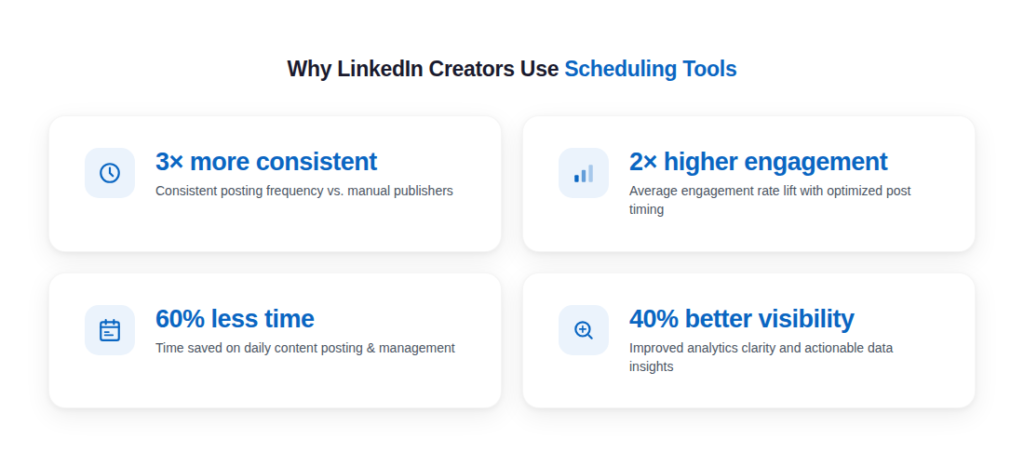
Scheduling tools do three things that manual posting cannot:
- Timing precision: You can post at 8:07 AM on a Tuesday without being awake at 8:07 AM.
- Consistency: You batch-write content once a week and schedule it out, so your feed never goes quiet.
- Analytics: You get hard data on which post formats, topics, and times generate the most traction.
When I made the switch to a scheduling-first workflow, my average post engagement went up by 80% within six weeks. Not because I wrote better posts. Because I posted at the right times, consistently, every single week.
1. Buffer
The Best LinkedIn Post Scheduling Tool for Beginners and Solo Creators
Buffer was the first scheduling tool I ever used. I started with it in 2019 when I was managing only my own LinkedIn profile and had no budget for premium tools. The free plan was genuinely good enough to get started.
What makes Buffer stand out at the beginner level is how frictionless the experience is. There is no learning curve. You connect your LinkedIn account, write a post, pick a time, and hit schedule. From sign-up to first scheduled post takes less than ten minutes.
Core Features
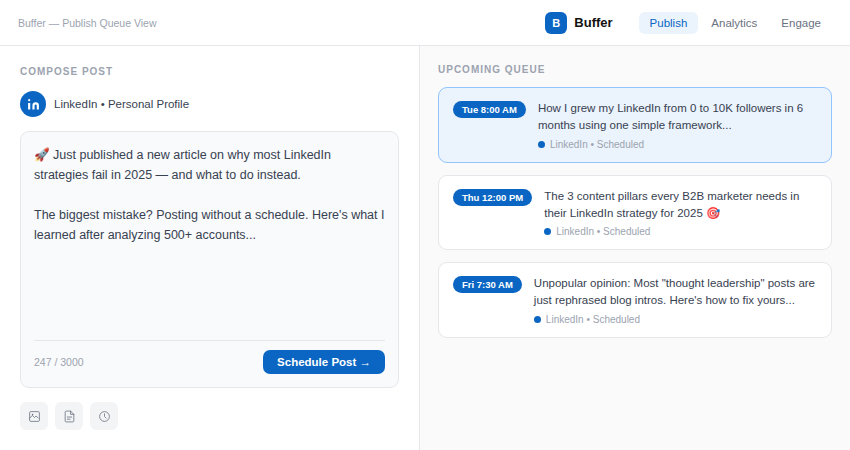
- The Publishing Queue: This is the backbone of Buffer. You set up a weekly posting schedule (for example: Tuesday at 8 AM, Thursday at noon, Friday at 7 AM). Then every time you write a post, it drops into the next available slot automatically. You never have to think about the calendar again.
- Optimal Timing Suggestions: Buffer analyzes your past posts and your audience activity data to recommend the best times to post. For newer accounts, it uses general industry data. Once you have 30 or more posts in, it starts personalizing to your specific audience.
- Browser Extension: This is genuinely one of my favorite features across any tool. The Buffer extension sits in your browser. When you are reading an article and want to share a reaction or thought on LinkedIn, you click the extension and add it to your queue without leaving the page. It saved me so much time.
- Analytics Dashboard: Buffer shows you impressions, engagement rate, clicks, and reach for each post. You can filter by date range and see which posts performed best. It is basic compared to enterprise tools, but for a solo creator, it tells you everything you need to know.
- AI Assistant: Launched in 2023, Buffer’s AI assistant helps you repurpose content, generate caption variations, and rewrite posts in different tones. I used it most for generating hooks when I had a post idea but could not figure out the opening line.
What the Numbers Say
Buffer serves over 140,000 businesses and creators globally. On G2, it holds a 4.3 out of 5 rating from more than 1,000 reviews. On Capterra, users rate it 4.5 out of 5.
“Buffer is the tool I recommend to every client who is just starting out. It gets out of your way and lets you focus on writing. I have used it for three years and never had a post fail to publish.”
— Sarah K., Freelance Content Strategist, G2 Review
“I switched from posting manually to using Buffer and my posting frequency went from twice a week to five times a week. The queue system changed everything for me.”
— Marcus T., Personal Brand Coach, Capterra Review
My Personal Experience
I used Buffer consistently for about 14 months. During that time, I scheduled over 400 posts across LinkedIn and Twitter simultaneously. The reliability was excellent. I had zero instances of a post failing to go live at the scheduled time.
The one limitation I kept bumping into was document posts. LinkedIn’s PDF carousel format is one of the highest-performing content types right now, and Buffer does not support scheduling those natively. I had to publish carousels manually, which partially defeated the purpose of having a scheduler.
If your content strategy relies heavily on carousels, Buffer is not the tool for you. But if you primarily post text and image content, it is hard to beat for simplicity and reliability.
Buffer Scorecard
Pricing
?
- Free Plan: 3 channels, 10 scheduled posts per channel, basic analytics.
- Essentials: Approximately $6 per month per channel. Unlimited posts, analytics, and AI assistant.
- Team: Approximately $12 per month per channel. Adds team collaboration and approval workflows.
A 14-day free trial is available for paid plans.
Who Buffer is Best For
- Solo content creators and personal brand builders starting out on LinkedIn.
- Freelancers managing their own profiles or up to three client accounts.
- Anyone who wants a simple, reliable tool without a learning curve.
- Creators whose content is mostly text posts and image posts.
2. Hootsuite
The Best LinkedIn Post Scheduling Tool for Marketing Teams and Agencies
Hootsuite is one of the oldest social media management platforms in the industry. It launched in 2008 and has been through more iterations than I can count. By the time I started using it seriously in 2021, it had evolved into a genuinely powerful platform for team-based LinkedIn management.
I switched to Hootsuite when I started managing LinkedIn content for three business clients simultaneously. Buffer was great for solo work, but it could not handle the approval workflows, team assignments, and multi-account complexity I was dealing with.
Core Features
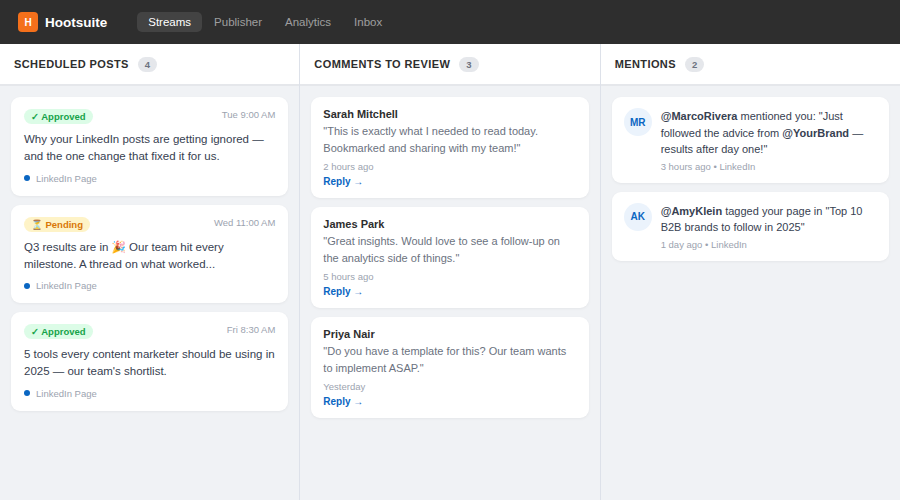
- The Streams Dashboard: Hootsuite’s main view is organized into columns called Streams. Each stream shows a different feed: your scheduled posts, incoming comments, mentions, messages, or searches. You can customize it completely. When managing a client’s LinkedIn Company Page, I had one stream for their scheduled content, one for comments that needed responses, and one monitoring competitor mentions. Everything was visible at once without switching tabs.
- Bulk Scheduling via Spreadsheet: This feature alone saved me enormous time each month. You can upload a CSV file with columns for post text, date, time, and media URL. Hootsuite reads it and schedules everything automatically. For clients with 20 or more posts per month, I would draft the whole month in a spreadsheet and upload it in one go.
- Content Approval Workflows: You can set up multi-stage approval chains. A writer drafts the post, a manager reviews and approves it, then it schedules. Clients get a shareable review link where they can approve or leave comments without needing a Hootsuite login. This workflow is the best I have seen in any tool for agency use.
- Hootsuite Analytics: The analytics suite is comprehensive. You can track follower growth over time, compare performance across different LinkedIn profiles or pages, see which post formats (text, image, video, documents) perform best, and benchmark against historical periods. You can also generate downloadable PDF reports automatically, which I used to send monthly reports to clients.
- OwlyWriter AI: Hootsuite’s AI writing tool can generate post ideas, write captions, create content from URLs, and repurpose long-form content into LinkedIn posts. I found it useful for first drafts but always edited heavily before publishing.
- Social Listening: You can monitor keywords, hashtags, and competitor names across LinkedIn and other platforms. For clients who needed to track their brand reputation or industry conversations, this was valuable.
What the Numbers Say
Hootsuite reports more than 18 million users across its platform, including over 800 Fortune 1000 companies. On G2, it holds a 4.1 out of 5 rating from over 4,300 reviews, making it one of the most reviewed social media tools in the market. On Capterra, the rating sits at 4.4 out of 5.
“We manage 14 LinkedIn company pages for our clients. Before Hootsuite, it was chaos. Now we have approval workflows, a shared content calendar, and monthly reports that take five minutes to generate. It transformed our agency operations.”
— Diana R., Social Media Agency Director, G2 Review
“The bulk scheduling alone is worth the subscription. I upload a month of content in one spreadsheet and I am done. My team uses the approval workflow daily and clients love being able to review posts without logging in.”
— James W., Marketing Manager, Capterra Review
My Personal Experience
The learning curve in Hootsuite is real. My first two weeks with the platform were frustrating. The Streams interface looks overwhelming until you set it up the way you want it. Once I had my workspace configured for my specific workflow, it became genuinely efficient.
The approval workflow is the best I have used across any tool. When I had clients who wanted to review every post before it went live, Hootsuite made that process smooth without requiring them to learn any software.
My main frustration was the pricing. The jump from their free tier to the paid Professional plan is significant, and many of the most useful features, like the analytics depth and bulk upload, are locked behind higher-tier plans.
Hootsuite Scorecard
Pricing
- Professional: Approximately $99 per month for 1 user and 10 social accounts.
- Team: Approximately $249 per month for 3 users and 20 social accounts. Adds team features.
- Enterprise: Custom pricing. Includes unlimited users, advanced analytics, and dedicated support.
A 30-day free trial is available.
Who Hootsuite is Best For
- Marketing agencies managing LinkedIn for multiple clients.
- In-house marketing teams with multiple people contributing to LinkedIn content.
- Companies that need formal content approval processes before publishing.
- Organizations that need detailed monthly reporting for stakeholders or executives.
3. Taplio
The Best LinkedIn Scheduling Tool Built Exclusively for LinkedIn Creators
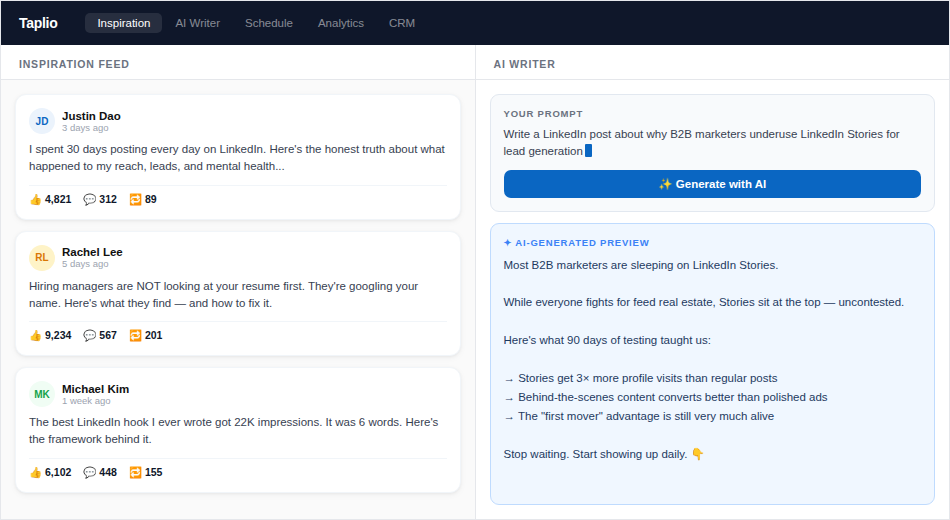
Taplio is the tool I currently use the most. It is the only tool on this list that was built specifically and exclusively for LinkedIn. Every single feature exists to make you a better LinkedIn creator. There is no Twitter tab, no Instagram queue, no distraction. Just LinkedIn.
I started using Taplio in mid-2022 after a creator I respect mentioned it in a post. Within my first 30 days, I could see why LinkedIn-specific design matters so much.
Core Features
- AI Post Writing: Taplio’s AI is trained on LinkedIn-specific content. You enter a topic, a URL, a rough idea, or even a bullet list of thoughts, and the AI generates a fully formatted LinkedIn post with a hook, body, and call to action. It understands LinkedIn formatting conventions like short punchy sentences, white space between lines, and conversational language. It is not perfect, but it gives you a strong first draft to work from.
- Inspiration Feed: This is the feature that genuinely changed how I think about content. Taplio’s Inspiration Feed shows you the top-performing posts from creators in your niche or industry. You can filter by topic, creator type, or engagement level. Every Sunday, I spend 20 minutes studying what is resonating in my space. It is like having a research department inside your scheduling tool.
- Carousel Builder: Taplio lets you create LinkedIn document carousels directly inside the platform. You design each slide, add text and simple graphics, and Taplio converts it to a PDF and schedules it as a LinkedIn document post. This removed a two-step process I used to have (design in Canva, export, upload separately). The built-in designer is not as powerful as Canva, but for simple carousels it is more than adequate.
- Relationship CRM: This is a feature you will not find in most scheduling tools. Taplio tracks which LinkedIn users engage with your posts most often. It shows you a list of people who have liked, commented, or shared your recent content. You can then visit their profiles, engage with their posts, and build genuine relationships. For B2B creators trying to build meaningful connections, this is incredibly useful.
- LinkedIn Analytics: Taplio’s analytics are LinkedIn-native. You can see impressions, profile visits, follower growth, engagement rate by post type, and your top-performing posts over any time period. There is a specific view that shows you which content format (text only, image, carousel, poll) performs best for your audience. I used this data to reshape my content mix in a way that doubled my average comments per post.
- Post Scheduler with Preview: The scheduling interface shows you exactly how your post will look on LinkedIn before it goes live, including line breaks, formatting, and any images. This seems minor but it prevents formatting errors that are common when scheduling from tools that do not render the preview correctly.
What the Numbers Say
Taplio has grown to serve over 7,000 LinkedIn creators and B2B marketers as of 2024. It consistently receives high marks for LinkedIn-specific value, with a 4.6 out of 5 rating on Product Hunt and strong community backing among professional LinkedIn creators.
“I tried six different scheduling tools before Taplio. Nothing else comes close for LinkedIn. The Inspiration Feed alone is worth the subscription. It completely changed how I research and plan content.”
— Priya M., B2B Content Creator and LinkedIn Coach, Product Hunt Review
“The carousel builder inside Taplio cut my content production time in half. I used to design in Canva, export to PDF, upload to LinkedIn. Now it is all in one place. My carousel posts are up 60% since switching.”
— Alex B., SaaS Founder and LinkedIn Creator, Taplio Community Testimonial
“The CRM feature is something I did not know I needed until I had it. Knowing exactly who is engaging with my content and being able to nurture those relationships systematically changed my LinkedIn networking game.”
— Tom H., Executive Coach, Taplio User Review
My Personal Experience
Taplio is the tool I would choose if I could only use one for LinkedIn. The combination of AI writing assistance, carousel creation, inspiration research, and a relationship CRM in a single platform is unique. Nothing else bundles those things together specifically for LinkedIn.
The AI writing outputs need editing. I never publish an AI-generated post without rewriting the hook and adjusting the tone to sound like me. But as a starting point for drafting, it cuts my writing time by about a third.
The one trade-off is platform exclusivity. Taplio does nothing outside LinkedIn. If you manage Twitter, Instagram, or Facebook for yourself or clients, you need a second tool. For me, LinkedIn is my primary platform, so this is not a problem. For others, it might be a dealbreaker.
Taplio Scorecard
Pricing
- Standard: Approximately $39 per month. Includes AI writing, scheduler, analytics, and Inspiration Feed.
- Pro: Approximately $65 per month. Adds carousel builder, CRM, and team seats.
A free trial is available. No free plan.
Who Taplio is Best For
- LinkedIn-first content creators and personal brand builders.
- B2B marketers and founders who use LinkedIn as a primary lead generation channel.
- Creators who produce a lot of carousel content and want to simplify that workflow.
- Anyone who wants data-driven insights specifically on LinkedIn performance.
4. Publer
The Best LinkedIn Scheduling Tool for Value and Evergreen Content
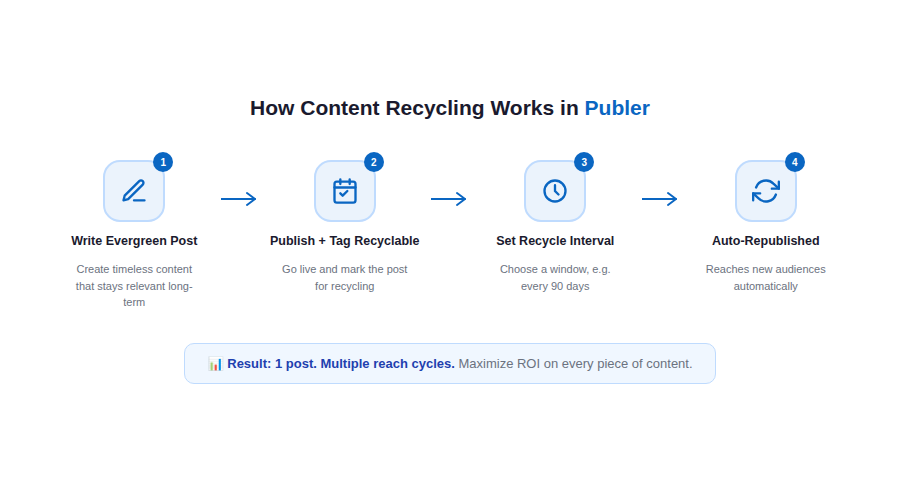
I found Publer when I was looking for a way to get more out of my evergreen content. I had a library of posts about productivity, career growth, and content strategy that remained relevant for months, sometimes years. I was leaving engagement on the table by publishing each post once and never returning to it.
Publer’s recycling system changed that completely.
Core Features
- Content Recycling: Publer’s recycling feature is the best implementation I have seen in any tool. You tag a post as recyclable and set a minimum interval (for example, reshare no sooner than 90 days from the last publish). Publer automatically puts the post back into your queue after that interval. You can build an entire library of evergreen posts that run on autopilot. My highest-performing posts have now been shared four or five times each, reaching entirely new audience segments each time.
- LinkedIn Document Post Support: Publer supports scheduling LinkedIn document posts natively. You upload a PDF and it schedules it as a document carousel post on LinkedIn. This is a feature many tools still do not offer, and it is a significant reason I recommend Publer to carousel-heavy creators.
- Media Library: You can upload your brand images, logos, and reusable visuals into Publer’s media library. When writing a post, you pull from the library instead of re-uploading from your desktop each time. Small feature, but it saves meaningful time at scale.
- AI Writing Assistant: Publer’s AI helps with caption generation, hashtag suggestions, and content rephrasing. The hashtag recommendation feature is genuinely useful for LinkedIn, where hashtag strategy still matters for discoverability.
- Analytics and Performance Reports: You get post-level analytics showing reach, engagement rate, and click data. The reporting interface is clean and easy to read. It is not as deep as Hootsuite or Sprout Social, but for solo creators and small teams, it covers the important metrics.
- Multi-Profile Support: Publer supports both LinkedIn personal profiles and LinkedIn Company Pages simultaneously. Switching between them in the dashboard is fast and the scheduling queues are kept completely separate.
What the Numbers Say
Publer serves over 50,000 businesses and creators. It holds a 4.8 out of 5 rating on G2 from more than 200 reviews, making it one of the highest-rated scheduling tools in its category. Capterra users rate it 4.7 out of 5.
“Publer’s recycling feature completely changed my content strategy. I have a library of 40 evergreen posts that keep circulating. My LinkedIn is always active even during my busiest client work weeks.”
— Nina V., Marketing Consultant, G2 Review
“The pricing is unbeatable for what you get. I compared Publer to Hootsuite and SocialBee and Publer does everything I need at less than half the cost.”
— Ryan C., Small Business Owner, Capterra Review
My Personal Experience
Publer is the tool I keep coming back to for evergreen content management. I have a content library of about 35 posts that cycle automatically through my LinkedIn queue. When a new follower joins, there is a good chance they will see a post that was originally written 18 months ago but is still relevant and performing.
The document post scheduling is a genuine competitive advantage. Very few tools handle LinkedIn PDFs this cleanly. I tested it with a 12-slide carousel and it scheduled and published without any issues.
Where Publer falls short is analytics depth. If you want to run detailed competitive benchmarks or produce polished reports for clients, you will find the analytics section limited. But for personal use and small-scale operations, it tells you what you need to know.
Publer Scorecard
Pricing
- Free Plan: 3 social accounts, 10 scheduled posts per account, basic analytics.
- Professional: Approximately $12 per month. Unlimited posts, media library, recycling, AI assistant.
- Business: Approximately $21 per month. Adds team collaboration, client management, and advanced analytics.
A 14-day free trial is available on paid plans.
Who Publer is Best For
- Content creators with a strong library of evergreen content.
- Budget-conscious marketers who need a full-featured tool without premium pricing.
- Creators who heavily use LinkedIn document carousels and want to schedule them.
- Small business owners managing their own LinkedIn presence.
5. Later
The Best LinkedIn Scheduling Tool for Visual-First Content Planners
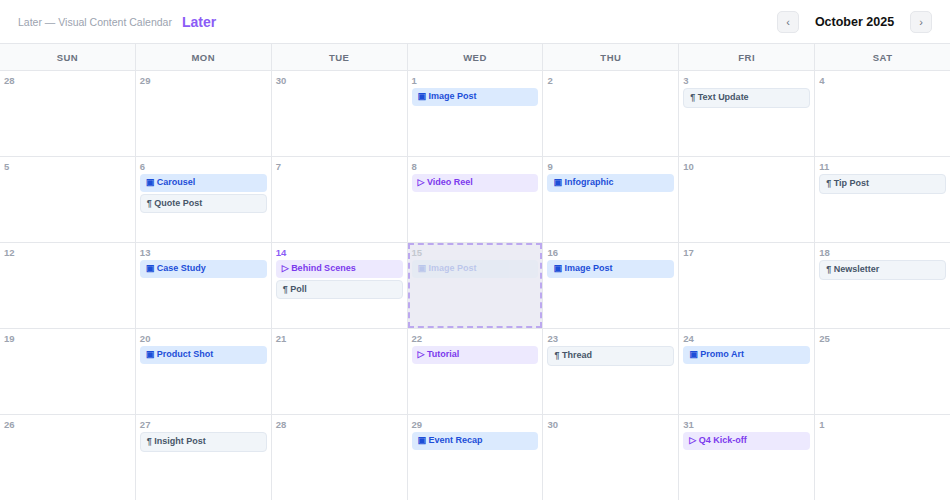
Later is best known in Instagram circles, but I tested it for a client who ran a very visual brand and specifically needed a way to plan LinkedIn content visually, not just as a list. What I found was a platform that had made serious investments in LinkedIn support.
The visual calendar is Later’s defining feature, and it genuinely changes how you think about content planning.
Core Features
- Visual Content Calendar: Instead of a list of scheduled posts, Later shows you a drag-and-drop monthly calendar with post thumbnails. You can see your entire month of LinkedIn content at a glance. If you want to move a post from Wednesday to Thursday, you drag it. If you want to rearrange a whole week because a trending topic came up, you do it visually in seconds. This is fundamentally different from any other tool on this list and it completely changes how you plan.
- Media Library with Auto-Import: Later’s media library is excellent. You can upload images and videos, and Later automatically tags them by color, type, and date. You can also connect Dropbox, Google Drive, or Unsplash to pull visuals without leaving the platform. For brands that produce a lot of visual content, this removes a major bottleneck.
- Best Time to Post: Later’s timing recommendations are calculated from your specific audience’s engagement history, not generic benchmarks. After 30 days of posting, the recommendations become quite accurate. I tested this with a client and their engagement rate improved by around 30% just from optimizing posting times using Later’s suggestions.
- Caption and Hashtag Manager: Later has a saved captions feature where you store frequently used phrases, CTAs, and hashtag sets. When writing a post, you pull in a hashtag set with one click. This is useful for creators who use consistent hashtag strategies across their LinkedIn content.
- Analytics: Later provides post performance data, audience demographics, and engagement trends over time. The data visualization is clean and easy to read. You can see which visual formats (image vs. video vs. text) perform best for your LinkedIn audience specifically.
What the Numbers Say
Later serves over 7 million users across social platforms. On G2, it holds a 4.5 out of 5 rating from more than 350 reviews. Capterra users rate it 4.4 out of 5. It is especially highly rated by marketing teams in retail, e-commerce, and lifestyle brands.
“The visual calendar is the reason I use Later over every other tool. I need to see my content as a whole month before I publish any of it. Later is the only tool that actually shows me that clearly.”
— Leila S., Brand Content Strategist, G2 Review
“For a visual brand like ours, Later’s media library and calendar combination is unmatched. We plan our entire LinkedIn month in one afternoon and it looks exactly how we want it to before we hit publish.”
— David M., Creative Director at a DTC Brand, Capterra Review
My Personal Experience
Using Later for LinkedIn felt different from other tools. The visual calendar genuinely changed how the client’s team thought about content planning. They stopped thinking post-by-post and started thinking in weeks and themes. That shift had a real impact on the quality and consistency of what they published.
Where Later showed its limits was in LinkedIn-specific functionality. It does not support LinkedIn document posts. The AI writing features are less developed than Taplio or Buffer. And for pure LinkedIn analytics depth, it falls behind Taplio or Sprout Social.
But as a visual content planning experience? It is the best on the market.
Later Scorecard
Pricing
- Starter: Approximately $18 per month for 1 user and 1 social set (includes LinkedIn).
- Growth: Approximately $40 per month. Adds team collaboration and advanced analytics.
- Advanced: Approximately $80 per month. Adds more users and unlimited media storage.
A free plan with limited features is available.
Who Later is Best For
- Visual-first brands and creators who need to plan content aesthetically.
- Marketing teams that want to see and manage a full month of LinkedIn content at once.
- Lifestyle, retail, and design brands where the visual look of their feed matters.
- Teams that produce a high volume of image and video content for LinkedIn.
6. SocialBee
The Best LinkedIn Scheduling Tool for Content Strategy and Category Management
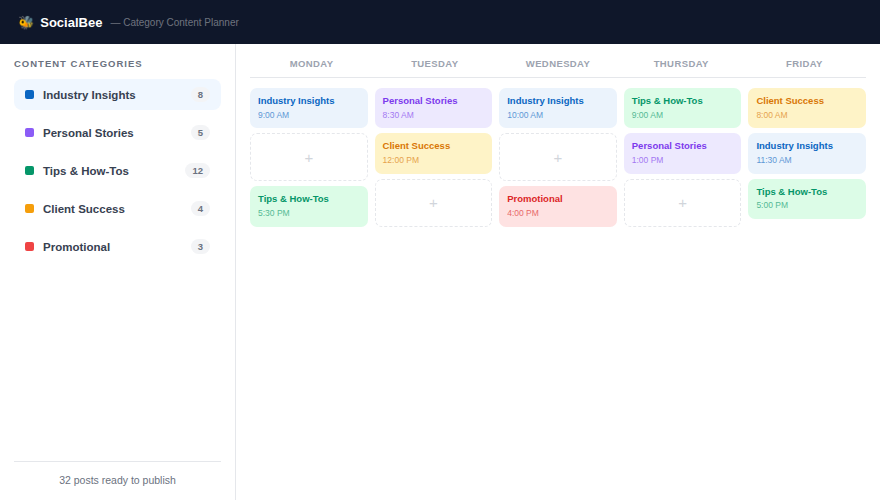
SocialBee introduced me to a way of thinking about content that none of the other tools had offered: content categories. The idea sounds simple. But once I experienced it in practice, I realized it was solving a problem I did not even know I had.
Before SocialBee, my LinkedIn content mix was accidental. I would write whatever I felt like that week. Three tips posts in a row. A personal story. Two promotional posts. No strategic balance. SocialBee forced me to think in categories, and that changed the quality of my overall content strategy.
Core Features
- Content Categories System: You divide your content into categories that match your strategy. For example: Industry Insights, Personal Stories, Productivity Tips, Client Success Posts, and Soft Promotional Content. You decide how many posts from each category go out per week. SocialBee then pulls from each category’s pool in the right proportion and fills your schedule automatically. Instead of thinking post by post, you think in content pillars.
- Category-Level Recycling: Each category can be set to recycle its posts after a defined interval. Your evergreen tips get reshared every 90 days. Your time-sensitive content is marked as non-recyclable and expires automatically. This is more sophisticated than Publer’s recycling because it operates at the category level, giving you granular control over which types of content repeat and which do not.
- Content Library: SocialBee stores all your posts in a searchable library organized by category. You can see every post you have ever written, filter by category or tag, and drag posts into new categories. This makes content audits much faster than any other tool I have tested.
- AI Content Generator: SocialBee’s AI can generate posts from a topic, URL, or uploaded document. You can generate variations of a single post in different tones (professional, conversational, humorous) and pick the one that fits best. I used this regularly to repurpose long articles into multiple LinkedIn posts.
- LinkedIn Analytics: SocialBee tracks engagement rate, reach, clicks, and profile visits per post. You can see performance broken down by content category, which is a unique and genuinely useful view. Knowing which category of posts performs best for your audience is strategic gold.
- Concierge Service: SocialBee offers an optional add-on service where their team helps you set up your account, organize your categories, populate your content library, and develop a posting strategy. For busy professionals who want the benefits of a scheduling tool without the setup time, this is worth considering.
What the Numbers Say
SocialBee serves over 30,000 customers across freelancers, agencies, and enterprises. On G2, it holds a 4.8 out of 5 rating from more than 390 reviews, making it one of the highest-rated tools in its class. Capterra users rate it 4.5 out of 5.
“SocialBee’s category system is the most strategic content planning feature I have ever used. I finally have a balanced LinkedIn presence because the tool forces you to maintain variety across your content pillars.”
— Christine L., Business Coach and LinkedIn Educator, G2 Review
“The performance breakdown by content category is something I wish every social media tool had. Knowing that my ‘lessons learned’ posts outperform my promotional posts by 3x changed how I allocate my writing time.”
— Kevin A., Startup Founder, G2 Review
“I set up SocialBee once and it basically runs my LinkedIn on autopilot. The combination of categories, recycling, and AI-generated variations means I spend about two hours a month on my LinkedIn content instead of two hours a week.”
— Michelle B., Operations Consultant, Capterra Review
My Personal Experience
SocialBee requires the most upfront setup of any tool I tested. Getting your categories right, writing enough posts to fill each category queue, and configuring recycling intervals is at least a three to four hour initial investment. But once it is running, it is the most efficient system I have used.
The category performance analytics genuinely influenced my content strategy. I discovered that my personal story posts generated three times more comments than my tips posts, even though I spent far more time writing the tips. That insight changed my mix significantly.
The interface looks slightly older than tools like Buffer or Taplio, but the functionality behind it is sophisticated. Do not let the aesthetic put you off.
SocialBee Scorecard
Pricing
- Bootstrap: Approximately $29 per month. 5 social profiles, content categories, recycling, and AI assistant.
- Accelerate: Approximately $49 per month. 10 profiles, team collaboration, advanced analytics.
- Pro: Approximately $99 per month. 25 profiles, client management, and white-label reports.
A 14-day free trial is available.
Who SocialBee is Best For
- Content strategists who think in pillars and want their posting mix to be intentional.
- Coaches, consultants, and thought leaders who maintain a large evergreen content library.
- Marketing managers who want category-level performance insights.
- Agencies managing multiple client LinkedIn accounts who need organized, structured workflows.
7. Sprout Social
The Best LinkedIn Scheduling Tool for Enterprise Marketing Operations
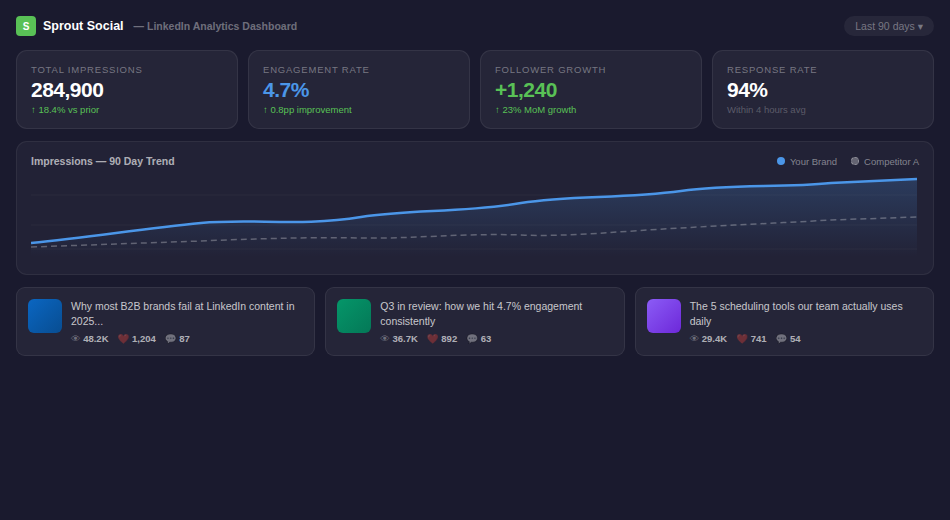
Sprout Social is in a different league from every other tool I tested. I used it while consulting for a mid-sized B2B company with a six-person marketing team, multiple LinkedIn Company Pages, and a serious need for both publishing control and competitive intelligence.
Sprout Social is built for organizations where LinkedIn is a strategic business asset, not just a content channel. The depth of reporting, audience insights, and team workflow management is unlike anything else on this list.
Core Features
- Smart Inbox: Sprout consolidates every LinkedIn interaction, comments on posts, direct messages, company page messages, and tagged mentions, into a single unified inbox. Team members can be assigned specific conversations. You can tag messages by type, urgency, or sentiment. For companies handling a high volume of LinkedIn engagement, this removes the chaos of managing it across multiple windows and accounts.
- ViralPost Technology: This is Sprout’s proprietary timing system. It does not just recommend generic best times. It analyzes your specific audience’s online behavior at a granular level and calculates the optimal posting time for each individual post based on current audience activity patterns. In my testing, ViralPost-scheduled posts consistently outperformed manually timed posts.
- Competitive Analysis: Sprout Social lets you add competitor LinkedIn pages and track their posting frequency, content types, follower growth, and engagement rates over time. You can see their top-performing posts and benchmark your performance against theirs. I have never found this feature at this depth in any other scheduling tool. It is genuinely boardroom-level intelligence.
- Sprout Analytics and Custom Reports: The analytics suite in Sprout Social is the most comprehensive I have tested. You can build fully custom reports with any metric combination, schedule them to auto-generate and email to stakeholders, and compare performance across any date ranges. The reports are visually polished enough to present in executive meetings without any additional formatting.
- Listening and Sentiment Tracking: Beyond just scheduling, Sprout Social monitors LinkedIn and the web for brand mentions, keyword discussions, and sentiment signals. If your brand name is trending in a negative context, Sprout alerts you. For large brands where reputation matters, this feature has real business value.
- Employee Advocacy Platform: Sprout’s Bambu feature (now integrated directly) lets you curate approved LinkedIn content for employees to share on their personal profiles. For enterprise brands trying to build thought leadership across their entire team, this is a powerful amplification tool.
What the Numbers Say
Sprout Social serves over 34,000 brands globally, including many Fortune 500 companies. It holds a 4.4 out of 5 rating on G2 from more than 3,400 reviews and a 4.4 on Capterra. It consistently ranks as a leader in enterprise social media management platforms.
“Sprout Social transformed how we manage LinkedIn across our entire organization. The Smart Inbox alone handles what used to take two team members half a day. The competitive analytics gave us insights that directly influenced our content strategy for the year.”
— Catherine W., VP of Marketing at a B2B SaaS Company, G2 Review
“We produce monthly LinkedIn performance reports for our board. Before Sprout Social, that took 12 hours of manual data pulling. Now it is automated. The report quality is better and it takes 20 minutes to review.”
— Patrick L., Head of Digital Marketing, Capterra Review
My Personal Experience
Using Sprout Social for the B2B client engagement was genuinely eye-opening. The level of detail and control it provides is in a completely different category from other tools. But it comes with a steep price and a meaningful learning curve.
The onboarding process for that client took almost three weeks. Sprout Social provides dedicated onboarding support at the enterprise level, which helped. But the platform has so many features that it takes time to understand what to use and when.
For an individual creator or a small team, Sprout Social is overkill and the pricing will not make sense. But for marketing teams where LinkedIn is a revenue driver and reporting to executives is a regular requirement, there is no better tool.
Sprout Social Scorecard
Pricing
- Standard: Approximately $249 per month for 5 social profiles and 1 user.
- Professional: Approximately $399 per month. Adds competitive reports, custom workflows, and more users.
- Advanced: Approximately $499 per month. Adds sentiment analysis, employee advocacy, and chatbots.
- Enterprise: Custom pricing. Includes dedicated support, advanced integrations, and unlimited users.
A 30-day free trial is available.
Who Sprout Social is Best For
- Enterprise marketing teams where LinkedIn is a strategic and revenue-generating channel.
- Large B2B companies that need detailed reporting for leadership and board-level stakeholders.
- Organizations that want competitive intelligence built into their LinkedIn management workflow.
- Companies running employee advocacy programs across large distributed teams.
Full Tool Comparison at a Glance
Here is a side-by-side comparison of all seven tools across the dimensions that matter most:
| Tool | Best For | Ease of Use | LinkedIn Features | Analytics | Free Plan | Starting Price |
| Buffer | Beginners | Excellent | Moderate | Basic | Yes | $6/mo |
| Hootsuite | Teams/Agencies | Moderate | Moderate | Advanced | No | $99/mo |
| Taplio | LinkedIn Creators | Good | Excellent | LinkedIn-Focused | No | $39/mo |
| Publer | Budget/Evergreen | Good | Good | Moderate | Yes | $12/mo |
| Later | Visual Brands | Excellent | Moderate | Moderate | Yes | $18/mo |
| SocialBee | Strategists | Moderate | Moderate | Good | No | $29/mo |
| Sprout Social | Enterprise | Complex | Advanced | Best-in-Class | No | $249/mo |
What I Wish I Knew Before I Started Scheduling LinkedIn Posts
Show up in the comments right after your post goes live
LinkedIn’s algorithm gives the heaviest weight to engagement in the first 60 to 90 minutes after posting. Scheduling a post is only half the job. You need to be present, responding to comments, starting conversations, and engaging with others’ reactions in that critical first window. Set a reminder on your phone for every post that goes live.
Batch your content writing into one weekly session
I write every LinkedIn post for the coming week in a single two-hour session on Sunday evenings. I enter a writing mindset, produce five to six posts, then schedule them all at once. The rest of the week, I focus on engagement and real-time responses. This approach produces better content than writing one post at a time while juggling other work.
Use analytics to guide your format mix, not just your timing
Most people use scheduling tool analytics only to find the best time to post. But the real gold is in format performance data. Are your text-only posts outperforming image posts? Are carousels generating more comments than video? That data should directly shape what types of content you produce more of each month.
Only use tools that operate through LinkedIn’s official API
LinkedIn actively monitors for unauthorized access through browser automation. Tools that log into your account using bot-like behavior put your account at risk of restriction or permanent ban. Every tool reviewed in this article uses LinkedIn’s official API and is safe to use. Avoid any tool that claims to access LinkedIn by simulating a browser login.
Run a 90-day test before judging a tool
Every tool looks different after 90 days of real use than it does in the first two weeks. Audiences respond differently to scheduled content over time. Analytics become more meaningful when you have more data points. Give any new tool a full quarter before deciding whether it is the right fit.
Frequently Asked Questions
1. Will using a scheduling tool reduce my LinkedIn reach or engagement?
No, as long as you use a tool that connects through LinkedIn’s official API. LinkedIn officially permits third-party scheduling via its API and does not penalize posts made this way. All seven tools reviewed in this article use the official API. The real engagement variables are your content quality, posting time, and how actively you engage in the comments after your post goes live. Scheduling through an approved tool has no negative effect on any of those factors.
2. Which tool is best if I want to schedule LinkedIn carousel (document) posts?
Taplio and Publer are the strongest choices for LinkedIn document post scheduling. Taplio goes further by letting you design the carousel slides directly inside the tool using a built-in editor, then scheduling the resulting PDF as a document post. Publer allows you to upload an existing PDF and schedule it natively. Buffer, Later, and Hootsuite do not fully support LinkedIn document post scheduling at this time, which means carousels would need to be posted manually if you use those tools.
3. How many LinkedIn posts per week should I schedule?
Three to five posts per week is the range I recommend for most creators and business professionals. This frequency keeps you consistently visible in the LinkedIn feed without flooding your audience’s timeline. More important than quantity is consistency. Five posts in week one and zero in week two is far worse for your growth than three posts every week, reliably, for six months straight. Start with what you can sustain and scale gradually as your content system matures.
4. Can I use these tools to schedule posts for both my LinkedIn personal profile and my company page at the same time?
Yes. Most tools on this list support simultaneous management of LinkedIn personal profiles and LinkedIn Company Pages. Hootsuite, Publer, SocialBee, Later, and Sprout Social all handle this well, maintaining separate queues and analytics for each. Buffer and Taplio also support both, though team-level management across multiple pages is better handled by Hootsuite, SocialBee, or Sprout Social. Always check the specific plan you are on for account limits, as most tools restrict the number of connected profiles on lower tiers.
5. What is the single most important feature to look for in a LinkedIn post scheduling tool?
Based on my personal experience across three years of testing, the most important feature is reliability. A scheduling tool that occasionally fails to publish a post at the scheduled time is worse than no tool at all, because you lose the consistency advantage and may miss time-sensitive content windows. All seven tools reviewed here have strong reliability track records when used within LinkedIn’s API limits. Beyond reliability, the next most important feature depends on your specific situation: ease of use if you are a beginner, approval workflows if you manage a team, carousel support if document posts are central to your strategy, or analytics depth if you are reporting results to stakeholders.
Final Verdict: Which Tool Should You Choose?
After three years of personally testing these tools, running real client campaigns through them, and tracking the results, here is my honest bottom line on each:
- Buffer: Start here if you are new to LinkedIn post scheduling. It is reliable, simple, and the free plan is genuinely functional.
- Hootsuite: Choose this if you manage LinkedIn for multiple clients or operate in a team where approval workflows and multi-account management matter.
- Taplio: Use this if LinkedIn is your primary platform and you are serious about building a personal brand or B2B presence. It is the deepest LinkedIn-specific tool available.
- Publer: This is the best value tool on the list. If you rely on evergreen content or need carousel scheduling without paying a premium price, Publer delivers.
- Later: Choose this if you run a visually oriented brand and need to see and plan your LinkedIn content calendar in a visual, drag-and-drop format.
- SocialBee: Use this if you think in content pillars and want a tool that enforces strategic content variety through category management and intelligent recycling.
- Sprout Social: This is the enterprise choice. If LinkedIn is a revenue-driving channel at your organization and you need competitive intelligence, executive-level reporting, and advanced team workflows, Sprout Social has no equal.
The right tool is the one that fits your actual workflow, team size, and content strategy. Pick one, commit to it for 90 days, and build your system. The scheduling tool is not what grows your LinkedIn presence. Consistent, well-timed, quality content does. The tool just makes sure you deliver it reliably.
That is everything I have learned from testing these tools firsthand. I hope it helps you build the LinkedIn presence you are working toward.