Explore the list of Authoring tools you can use when starting with Technical Writing
Clear documentation is not created by writing alone. In technical writing, the tools you use can significantly influence how efficiently you structure content, manage large documentation sets, and publish information across different formats.
While regular word processors may work for small documents, they often struggle when documentation becomes complex, collaborative, or requires structured publishing.
This is where authoring tools designed for technical writing become essential. These tools help organize content, reuse information across multiple documents, and publish documentation in formats such as web pages, PDFs, or knowledge bases.

Over time, I have explored several authoring tools while working on different types of documentation, including user guides, developer documentation, and help systems. Each tool offers unique capabilities, from structured authoring and single source publishing to collaborative documentation environments.
In this article, I share 10 of the best authoring tools for technical writers in 2025. These tools can help streamline documentation workflows, improve consistency, and make it easier to create professional technical documentation.
What is an Authoring Tool?
An authoring tool in technical writing refers to a software application or platform designed specifically for creating, editing, managing, and publishing technical documentation and content.
Authoring tools make tech writing easier. They have special features that regular word processors don’t have. These tools help writers organize and manage complex information better.
With authoring tools, writers can:
- Structure content logically using headings, tables, lists etc.
- Reuse the same content across multiple documents easily.
- Add multimedia like images, videos, diagrams seamlessly.
- Generate different formats like PDFs, web pages, ebooks from the same source.
- Collaborate with team members, track changes, control versions.
Regular word processors can’t do all this efficiently for big technical projects. Authoring tools streamline the entire writing process for technical documentation. They ensure consistency and high-quality output.
Now, if you are a beginner in technical writing, this list of authoring tools will give you a quick idea about the best authoring tools you can get started with.
Top 10 Authoring Tools For Technical Writers
1. Adobe FrameMaker:
Adobe FrameMaker has long been considered an industry standard for creating complex technical documentation.
I first encountered FrameMaker while working with structured documentation systems. What makes this tool powerful is its ability to handle large scale documentation projects that involve structured content and multiple output formats.
FrameMaker supports XML and DITA based structured authoring, which makes it particularly valuable for enterprise documentation teams.
Many large organizations rely on FrameMaker for creating product manuals, aerospace documentation, and engineering documentation where precision and structure are essential.
Key features
- Supports XML and DITA structured authoring
- Advanced cross referencing and indexing tools
- Handles very large documents with thousands of pages
- Supports multi format publishing such as PDF, HTML, and mobile outputs
- Integrates with Adobe Creative Cloud tools
One interesting fact is that FrameMaker has been used in industries like aerospace and manufacturing for decades, where documentation accuracy and consistency are critical.
Pricing typically follows a subscription model, though perpetual licenses have also been available historically.
2. MadCap Flare:
MadCap Flare is one of the most popular tools for single source publishing in technical documentation.
When I first explored MadCap Flare, what stood out was how it allows writers to create content once and publish it across multiple platforms without rewriting the documentation.

This is extremely useful when documentation must be delivered as:
- Online help systems
- Knowledge bases
- PDF manuals
- Mobile documentation
Flare uses topic based authoring, where documentation is broken into reusable components instead of long documents.
Key Features:
- Topic based documentation structure
- Single source publishing across multiple channels
- Responsive documentation for mobile devices
- Integration with version control systems like Git
- Conditional content and content reuse capabilities
MadCap Flare is widely used in software companies and SaaS organizations because it simplifies documentation management for complex products.
Pricing: usually subscription based or perpetual license depending on the plan.
3. Oxygen XML Editor:
Oxygen XML Editor is one of the most powerful tools for structured technical documentation.
I began using Oxygen XML while working with DITA based documentation systems. Compared to traditional editors, Oxygen provides an environment specifically designed for XML authoring.
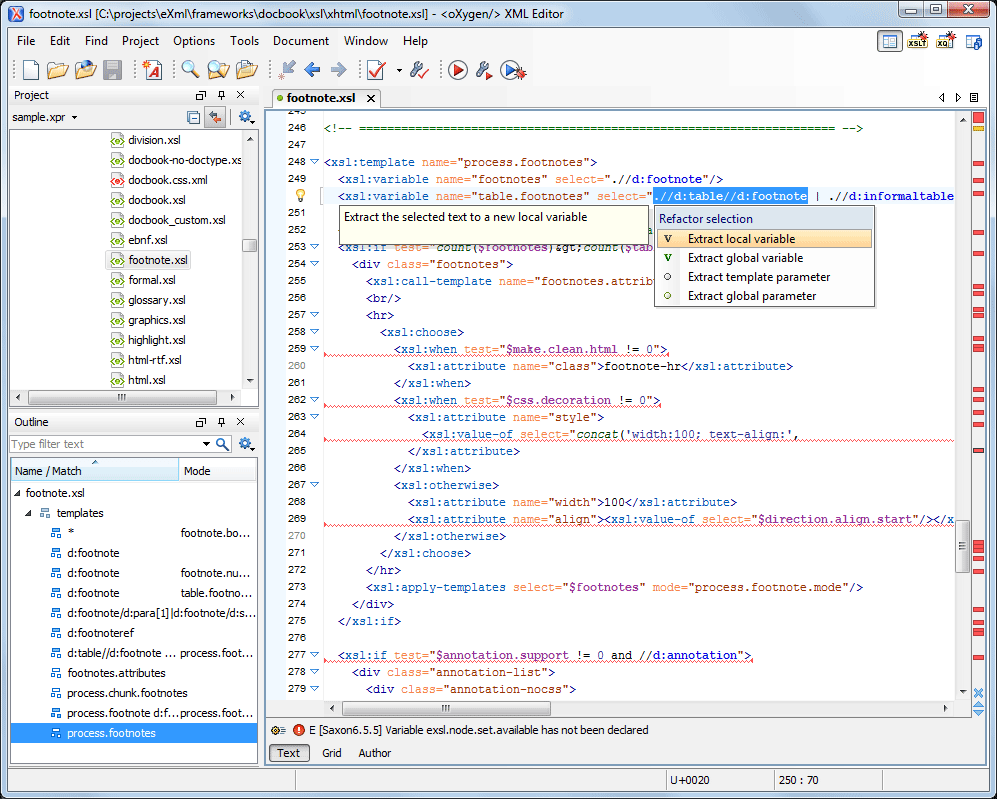
Source: Oxygen XML Editor 16.0
What makes Oxygen unique is its ability to support multiple markup languages and structured documentation frameworks.
Key Features:
- Advanced XML editing capabilities
- Full support for DITA and DocBook
- Validation and debugging tools for structured content
- Customizable frameworks for documentation workflows
- Git integration for version control
Oxygen is particularly popular among organizations that rely heavily on structured documentation standards.
Another interesting detail is that Oxygen is often used by documentation teams working with enterprise knowledge management systems.
Pricing: typically includes both subscription and perpetual license options.
4. Atlassian Confluence:
Confluence is not a traditional authoring tool, but I have found it extremely useful for collaborative documentation environments.
Many product teams use Confluence to maintain internal documentation, technical knowledge bases, and product specifications.
What I like about Confluence is how easily teams can collaborate on content. Engineers, writers, and product managers can contribute to the same documentation space.
Key features
- Wiki style collaborative documentation platform
- Easy content organization with spaces and pages
- Integration with Atlassian tools like Jira
- Templates for technical documentation
- Macros for embedding diagrams, code, and tables
Confluence is widely used by software development teams practicing Agile and DevOps workflows.
While it may not replace structured authoring tools, it works extremely well for collaborative documentation projects.
Pricing: is typically subscription based for cloud or self hosted versions.
5. Adobe RoboHelp:
Adobe RoboHelp is a specialized authoring tool focused on online help systems and user assistance documentation.
I explored RoboHelp while researching tools for creating interactive documentation experiences.
One of its strongest capabilities is creating context sensitive help systems, where help documentation is integrated directly into software interfaces.
Key features
- Designed specifically for online help documentation
- Responsive HTML5 help systems
- Context sensitive help integration
- Multi format publishing options
- Integration with Adobe tools
Many software products use RoboHelp to create help portals that users can access directly from within applications.
RoboHelp continues to evolve as a modern help authoring solution.
Pricing: is typically subscription based.
6. HelpNDoc:
HelpNDoc is one of the most beginner friendly help authoring tools I have tested.
Unlike some enterprise documentation platforms, HelpNDoc focuses on simplicity while still supporting professional documentation output.
What impressed me about HelpNDoc is its ability to generate documentation in multiple formats without requiring complex configuration.
Key features
- Simple and intuitive interface
- Support for HTML, CHM, PDF, and Word output
- Built in templates and design customization
- Context sensitive help features
- Full text search support
HelpNDoc is often used by small teams or independent technical writers who want to create documentation quickly without managing complex systems.
Pricing: varies from free versions to paid licenses depending on the features.
7. Paligo:
Paligo is a modern cloud based component content management system (CCMS) designed specifically for structured technical documentation.
I explored Paligo when researching cloud based documentation solutions, and what stood out immediately was its focus on structured content reuse and collaboration.
Paligo supports DITA based documentation and allows writers to manage reusable content components across multiple documents.
Key features
- Cloud based documentation platform
- Structured authoring using DITA principles
- Component level content reuse
- Built in translation management
- Integration with GitHub and automation tools
Paligo is commonly used by large documentation teams managing multilingual documentation projects.
Pricing: typically follows a subscription model.
8. ClickHelp:
ClickHelp is another cloud based documentation platform that focuses on creating modern online documentation portals.
One feature I particularly appreciate is the platform’s ability to create documentation websites that are easy to navigate.
ClickHelp also includes built in analytics that show how users interact with documentation.
Key features
- Online documentation and knowledge base creation
- Single source publishing system
- Collaboration and version control tools
- Interactive tutorials and simulations
- Built in documentation analytics
These analytics help documentation teams understand which articles users read most often.
Pricing: Subscription-based plans.
9. Author-it:
Author it is a long established authoring environment that supports both technical documentation and eLearning content creation.
The tool uses a modular content architecture that allows writers to store and reuse documentation components.
Key features
- Structured authoring using XML and DITA
- Content reuse across multiple documents
- Translation management tools
- Multi format publishing including HTML, PDF, and ePub
- Version control support
Author it is often used by organizations that produce training content along with technical documentation.
Pricing: typically includes subscription or enterprise licensing.
10. StackEdit Markdown Editor:
StackEdit is a lightweight Markdown editor that offers a completely different approach to technical writing.
While it may not have the complexity of structured authoring platforms, it provides a fast and distraction free writing environment.
I often recommend Markdown based tools to writers who prefer developer friendly documentation workflows.
Key features
- Markdown based documentation editing
- Real time preview while writing
- Export to HTML, PDF, and Word formats
- Integration with cloud storage platforms
- Lightweight and browser based
Markdown editors like StackEdit are widely used by developers and open source documentation teams because they integrate well with Git based workflows.
Many modern documentation platforms also support Markdown as a content format.
How to Choose the Right Authoring Tool
Choosing the right authoring tool depends on the type of documentation you create.
For example
- Large enterprise documentation systems benefit from structured authoring tools like Oxygen XML or Paligo.
- Software documentation teams often use MadCap Flare or ClickHelp.
- Collaborative product documentation may work better with tools like Confluence.
- For lightweight workflows, Markdown editors such as StackEdit are often sufficient.
The key is to choose a tool that matches your documentation complexity, team size, and publishing requirements.
Final Thoughts
Technical writing has evolved significantly over the years, and the tools we use have become more powerful and specialized.
From structured authoring platforms to lightweight Markdown editors, there are now many options available for documentation teams.
Based on my experience exploring these tools, the best authoring tool is not necessarily the most complex one. It is the one that fits your documentation workflow and helps you produce clear, structured, and maintainable documentation.
If you are starting your journey in technical writing, experimenting with different authoring tools can help you discover which workflow suits you best.
To maintain high-quality output, check out our Style Guide for Technical Writing for a practical look at standards.
The tools listed here represent some of the most widely used solutions in modern technical documentation environments.
As documentation systems continue to evolve, authoring tools will play an even bigger role in helping technical writers deliver clear and effective documentation.